Azure DevOps Defect Management Guideline
Version: 2, effective date: 07-Dec-2022
Contents
1 Document Objectives and Benefits
1.1 Objectives
This document aims to provide a clear guideline about Test automation for functional testing for T&T systems, environment configurations and BDD standards.
2 Definitions
| Abbreviation / Term | Explanation |
|---|---|
| T&T | Track & Trace |
| ROI | Return On Investment |
Please refer to IT Glossary in the IT P&P portal for further definitions.
3 Roles & Responsibilities
Accountable: Approves the activity or recommendations from a person or team.
Responsible: Responsible for doing the work associated with an activity, either by completing personally or through sole accountability for a team’s output.
Consulted: Reviews the output of an activity and provides input but has no approval authority. Provides support to activity and may be consulted by the team during the course of the activity.
Informed: Is informed about activities to aid in planning own work.
| # | Activity | GDC TTDC | BTS T&T | GSC CP |
|---|---|---|---|---|
| 1 | Define and maintain standard | A/R | C | I |
| 2 | Apply the standard in the T&T Implementation process | A/R | R | C |
4 Bug Record Creation
4.1 Execution explored bug
Defects/Bugs found during the test execution should be recorded as following instructions:
- Navigate to Azure DevOps URL and select the test project which includes the test suites to be executed.
- Click the test case to be executed and click on the “Run” for Web Application button from right top corner
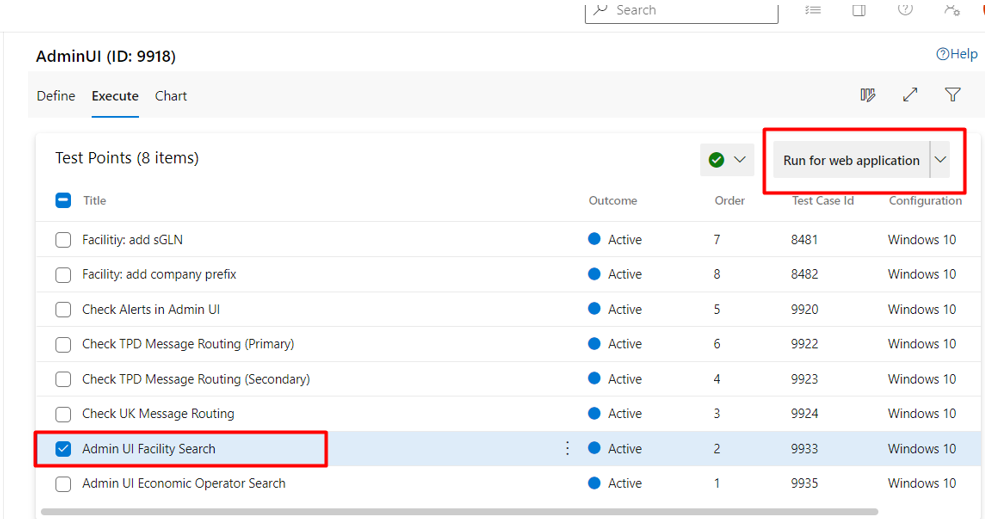
- Test Runner Window should appear listing the test steps to be executed.
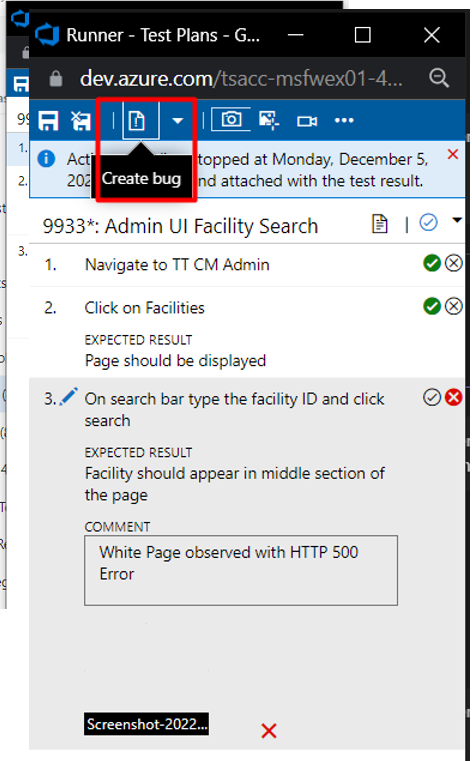
-
During the execution remember to check each test step either pass or fail depending on the actual results observed with the actual result value saved as both a Screenshot and a text file.
-
If a failure observed with the indication as an unexpected failure can be classified as a bug/defect click on create a bug button from the top icon.
-
A New Bug Record Creation window should appear with the test execution summary recorded in Repro Steps section included.
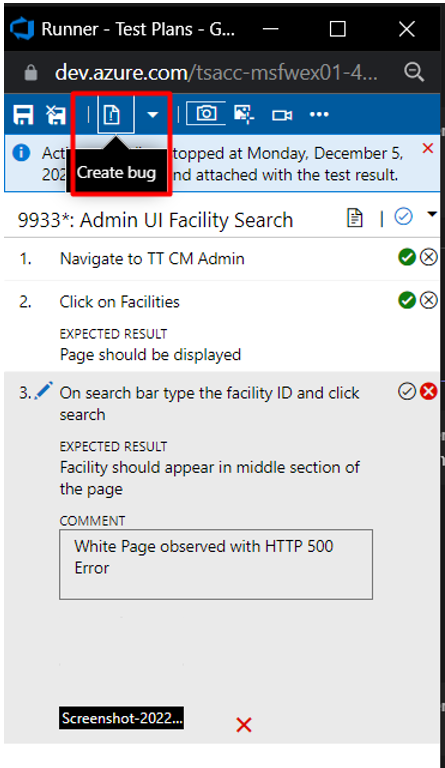
- Details of bug record creation will be discussed below in bug report section.
4.2 Bug records with no test case relation
Some bugs will be discovered before a test case is executed or found independently. When this happens follow the below instructions
- Navigate to Azure DevOps URL and select the test project which includes the test suites to be executed
- At the top left-hand side, see the “+” icon near the project name from the Azure menu, expand and select the Bug option
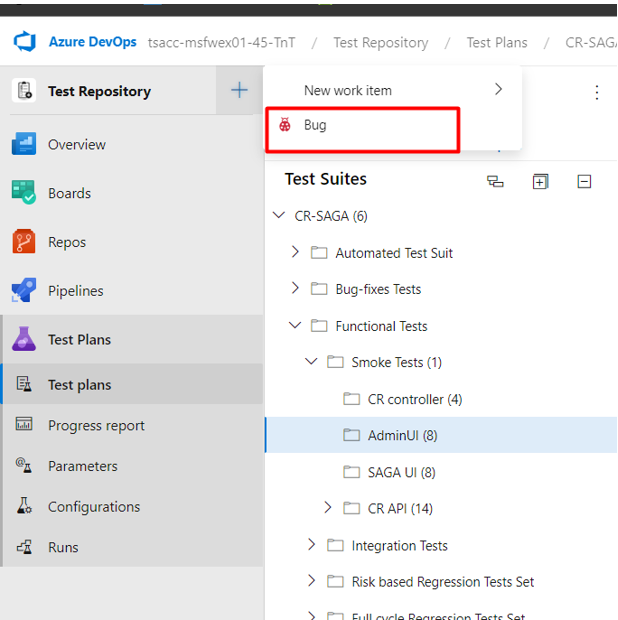
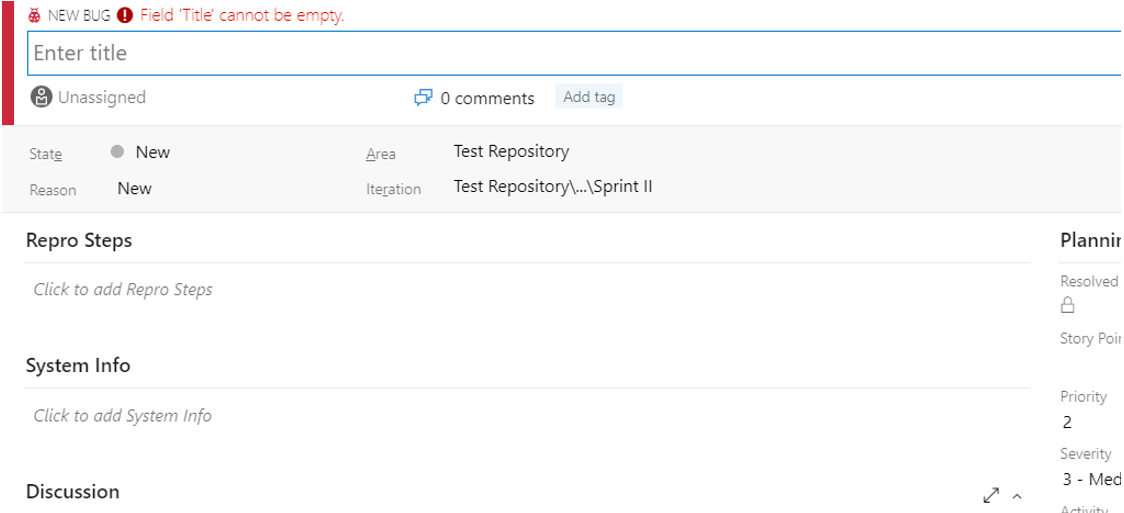
- A New Bug Record window should appear, different from the above topic, this will be blank in the sections to be described, and in the related section details of the bug, and record creation will be described.
5 Bug/Defect record management
5.1 Header
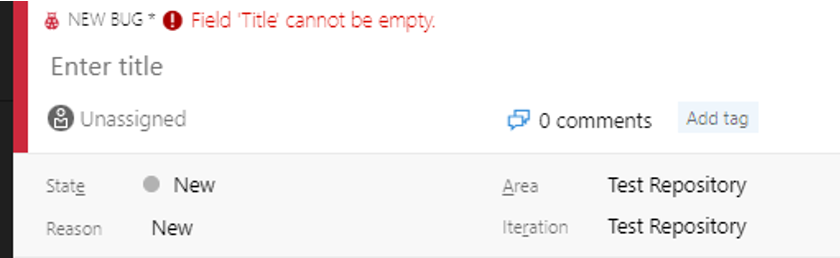
Header Section consists of a few sections which show the title and status of a bug record.
Note: At the current version some titles are not in use and therefore not mentioned.
5.1.1 Title
-
Keep it short and specific.
-
Ensure that it concisely describes the nature of the problem. Providing a descriptive title for your bug report makes it simpler for the developer to locate duplicates and integrate them.
-
Example: UK to UK Shipment – Unknown Master Data Error for a registered MD
5.1.2 State
There are pre-set states for a bug
-
New: Represents a bug in the creation stage still in progress of identification or modification
-
Active: Indicates that the bug record is active and waiting for a fix
-
Resolved: If a bug is fixed and the re-test is successful it will be marked as resolved.
-
Closed: Record closed without a fix this can happen when the record was rejected by the dev team as a bug or a configuration issue was triggering the situation.
5.1.3 Iteration
If working in an agile methodology, the sprints in that bug are discovered can be marked and followed up.
5.1.4 Tags
During the spring meetings, PM and Team Leader will classify the tags to be used in defect management. All bugs should be addressed with sprint tags.
5.1.5 Assignment
Shows the team member who is responsible for the bug record
5.1.6 Comments
Shortcut to track communication on record.
5.2 Body
The body part mainly consists of the description of the bug, its relation to other work items, and environment information. There are requirements to be followed up rather strictly to have a common way of working within the team.
5.2.1 Repro steps
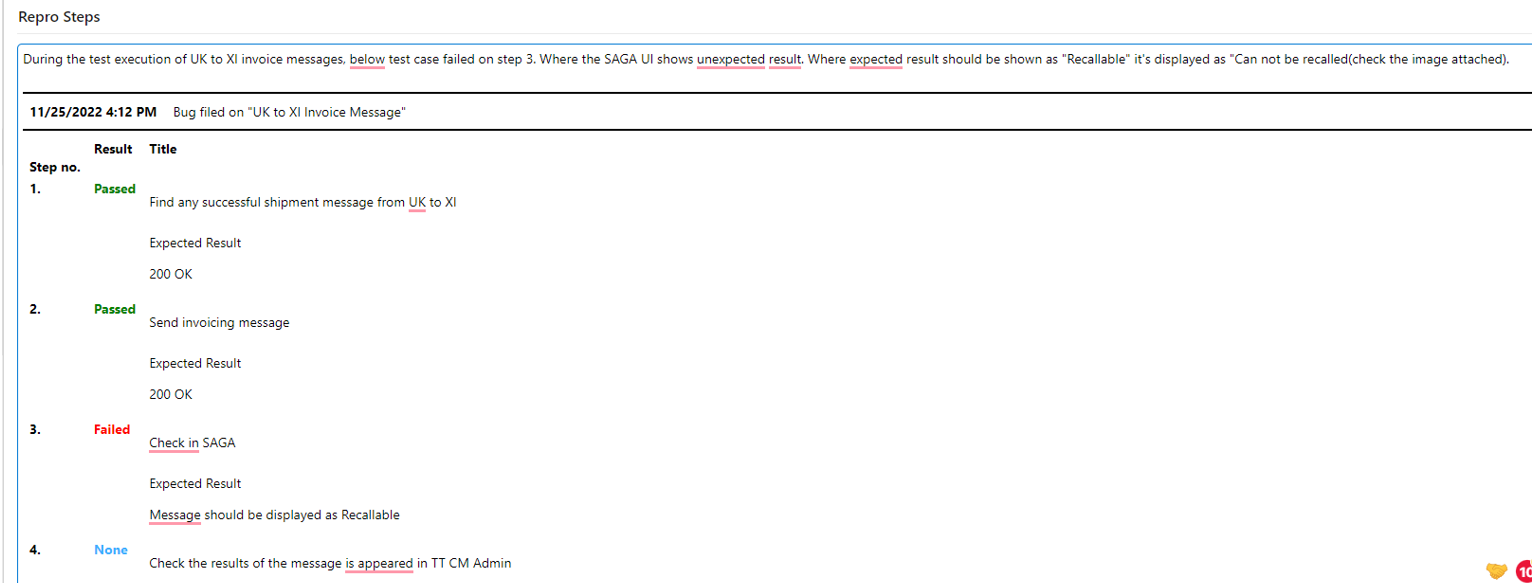
This part is mainly the description of the bug explored and the steps to reproduce it for the dev team.
-
Write one scenario for each defect; the simpler the scenario, the easier it will be to resolve the issue.
-
Utilize pictures - use images as a standard practice. This reduces evaluation time and effort associated with complex descriptions.
-
Avoid the desire to capture the subjective thoughts, feelings, or concerns that you see. If descriptions and images are inadequate, they can be used as a last resort.
-
Check if the test steps are followed and the step which failed is marked easily identified.
-
Attach the test data used during test execution.
-
Try to avoid using emotive language while describing real outcomes.
5.2.2 System info
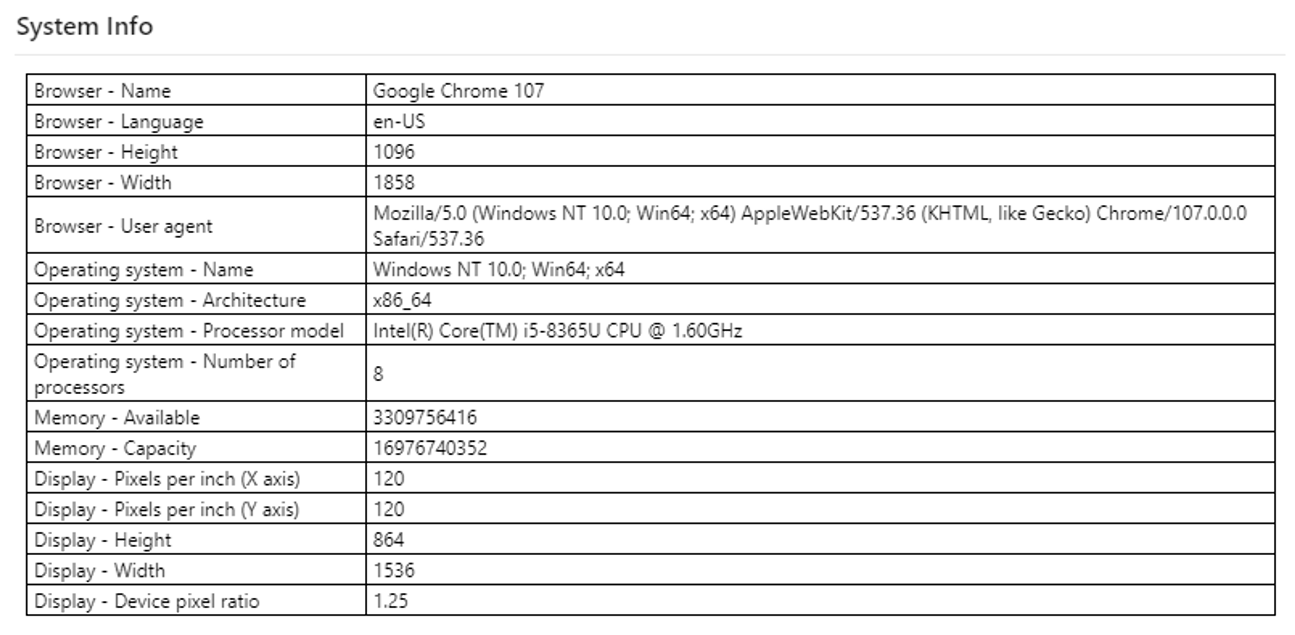
The system info section is optional but if the creation of a bug record is made from the test execution step Azure will automatically collect the system info and paste it into the section.
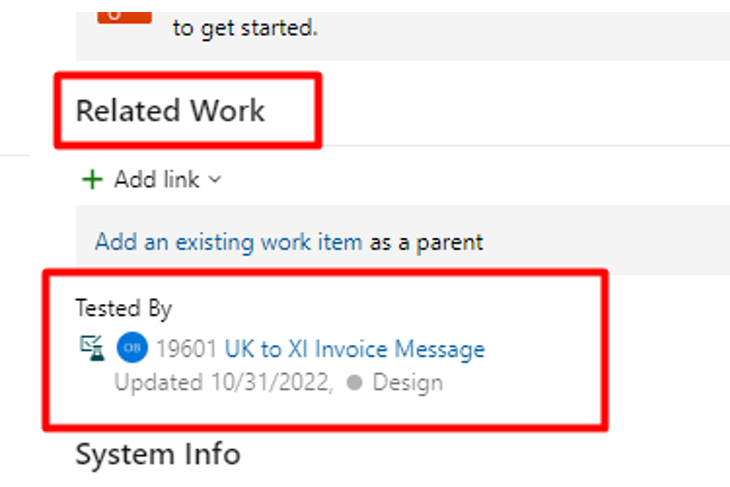
5.2.3 Related work
This section displays the relation with the test case affected by the bug record. There is a many to many relations with work items that can be added. Please identify all the test cases related to the bug record.
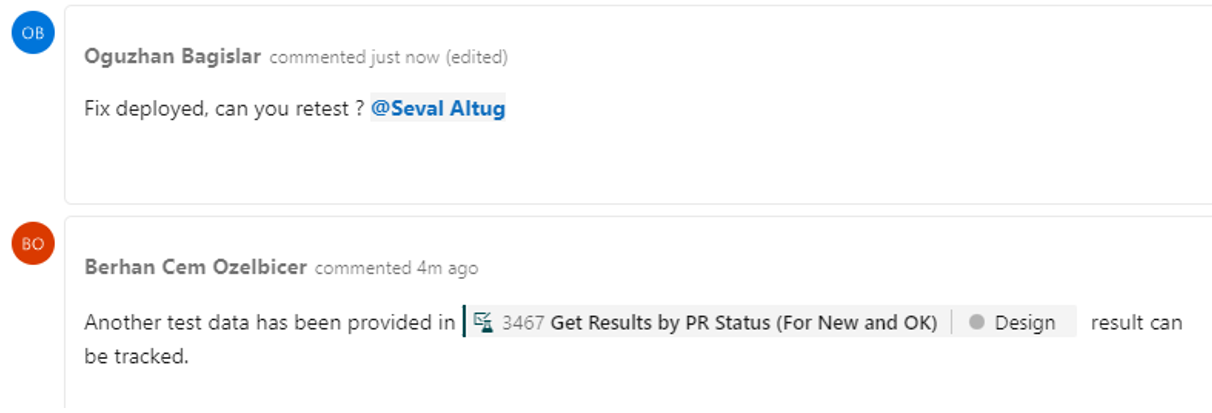
5.2.4 Discussion
Communication with members working on related activities can be done in this section.
6 Bug tracking
6.1 Defect planning
Before each project or sprint project team is required to come up with a classification for bug tickets, especially for tag management.
Some suggestions can be made as below,
-
Needs work - For items that need further information from the product owner or the individual who reported the problem.
-
Sample - As sample templates of how a bug report should be written and the information it should include.
-
UI - For user interface or UX-related concerns.
-
Watchlist - A problem that is not technically a bug, but rather a need for enhancement. Occasionally documenting everything that requires updating as a “bug” and using tags to sift through them.
-
Risk - Tag for anything that the end user identified as being incorrect or absent from the system, but it’s planned as it is during the design stage.
6.2 Preparations in Azure
At the beginning of each project or sprint, it’s advised to have a clean, standardized list in Azure DevOps to provide visibility. In Azure, it’s provided in the Boards -> Queries section.
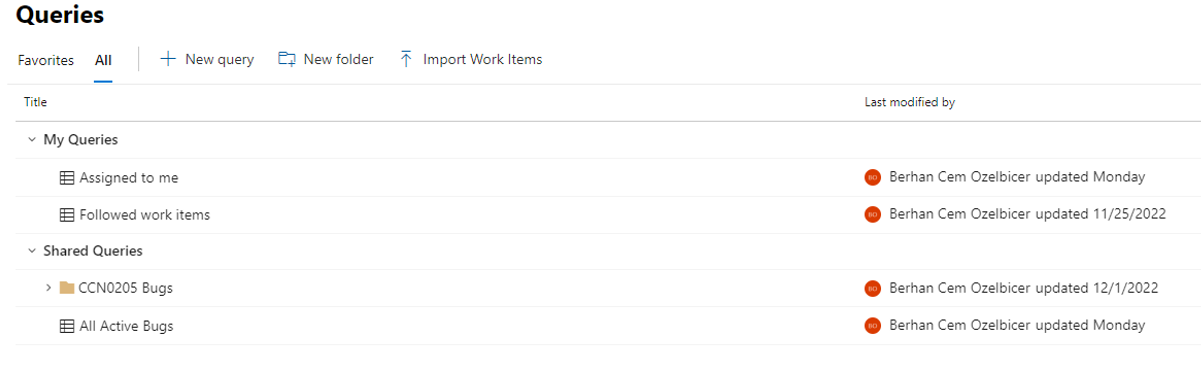
Queries can be created in two categories, personal or shared queries.
- Personal Queries: These queries are only visible to users who defined them. For example, “Assigned to Me” queries will display the queries only assigned to them.
- Shared Queries: These queries are public for teams who have access to the project. They are used to display given conditions. For example, “All Active Bugs” will list the same active bugs for all users.
It’s useful to have Shared queries planned and selected and defined before each project. As shown above picture, for example, all queries listed for a specific CCN can be stored in a folder.
Once expanded, related queries will be shown below,

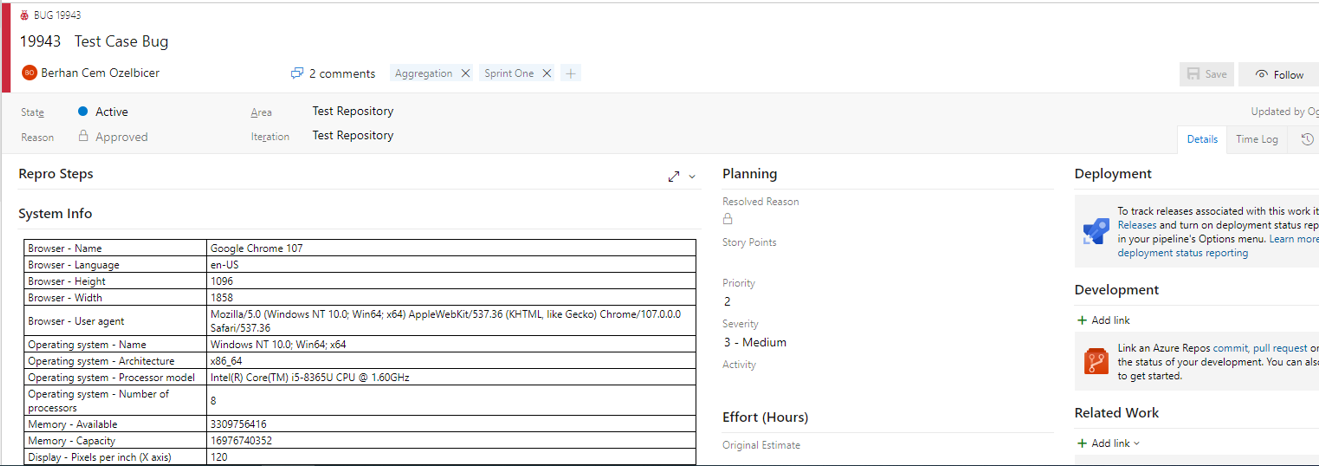
6.3 Tracking with queries
Once a query is run, it will display the results. Columns and states chosen will be displayed. In the side context sections, selected records will also be shown.

7 Document owner
The owner of the document is Berhan Cem Ozelbicer.
8 Document control
8.1 Contact person
Questions and feedback regarding this standard should be submitted to Olga Ovchinnikova.
8.2 Document review
The document will be reviewed in case new KPI metrics will be added or deleted on the global level.
8.3 Revision History
| Version | Effective date | Purpose of change | Author |
|---|---|---|---|
| 2 | 07-Dec-2022 | First version published | Berhan Cem Ozelbicer |
| 1 | 09-Aug-2022 | First draft of the document | Berhan Cem Ozelbicer |
9 References
References will be added here when necessary.
ANY QUESTIONS?