DataLake Technical Specifications
Version: 1, effective date: 30-Nov-2022
Contents
1 Standard description
This document provides the technical specifications for the DataLake project.
2 Document objectives and benefits
2.1 Objectives
The objectives of this document are
-
Forming the foundation of a knowledge base
-
Summarising the essential operational information
-
Providing direction to more detailed contextual information where it’s required
2.2 Benefits
The DataLake project’s operational/support team provides most of the required information in this document to validate understanding and assist with identifying gaps in knowledge.
The benefit of this document is that it also serves as a reference to other teams within JTI. The ARCI matrix in the section below illustrates the relevance of this document to each audience type.
3 Definitions
| Abbreviation / Term | Explanation |
|---|---|
| T&T | Track and Trace |
| Azure AD Group | “Azure Active Directory” groups are used to manage users that all need the same access and permissions to resources, such as potentially restricted apps and services. |
| ADSL | Azure DataLake System |
| SP | Stored Procedure |
| PK | Primary Key |
Please refer to IT Glossary in the IT P&P portal for further definitions.
4 Roles & Responsibilities
Accountable: Approves the activity or recommendations from a person or team.
Responsible: Responsible for doing the work associated with an activity, either by completing personally or through sole accountability for a team’s output.
Consulted: Reviews the output of an activity and provides input but has no approval authority. Provides support to activity and may be consulted by the team during the course of the activity.
Informed: Is informed about activities to aid in planning own work.
| # | Activity | Data Integration & Delivery Center | Project Development Teams | Enterprise Architecture |
|---|---|---|---|---|
| 1 | Maintaining and applying the standard | A/C | R | I |
5 Solution Technical Overview
5.1 Solution Architecture
A summary of the primary technical components, such as Azure Services and their function, including an architecture diagram.
If there is a logical naming convention of resources, then it is worth highlighting.
The solution consists of the following technical components:
| Technical Component | Name | Function |
|---|---|---|
| Azure Data Factory V2 | datafactory-msfnex20-10-TTHardening-GLB-dev | Ingestion pipelines of data from SQL Server sources to RAW layer of the Data Lake to Curated layer of Data Lake and Curated layer of Azure SQL Database. Data Sources: SQL SERVER data; Pipelines: Full Refresh Pipelines; Triggers: Scheduled Triggers. |
| Azure Data Lake (Gen2) | Storage of data based on the following folder structure: RAW: Global/Source Type/Factory/Dataset Type/Entity/Year/Month/Day/Hour CURATED: GSC/Global/TTHardening/Dataset Type/Entity/Year/Month/Day | |
| Azure SQL Database | Storage of metadata, raw to curated layer logs and curated layer data | |
| Azure Databricks | Provides a unified, open platform for all data. It empowers data scientists, data engineers, and data analysts with a simple collaborative environment to run interactive and scheduled data analysis workloads. | |
| Azure Logic App | Sending execution status email notification |
6 Data Overview
In this section, the summary of the data that is being processed will be explained.
6.1 Data Sources
Data sources are provided by different data source types such as SQL Server or SAP Database.
6.2 Data Source Availability and Maintenance Windows
As the number of data sources is vast, there were no specific times identified when the data sources might be under maintenance or unavailable.
6.3 Data Models
6.3.1 Dictionary, process control, and log tables
-
[GSC_GLB_TTHardening].[SqlSrcExecParam] - Metadata for source servers and databases
-
[GSC_GLB_TTHardening].Conf_Entity - Metadata for entities
-
[GSC_GLB_TTHardening].Conf_Factory - Metadata for factories
-
[GSC_GLB_TTHardening].Conf_DataSetType - Dataset Type Description
-
[GSC_GLB_TTHardening].[Conf_LastExtraction] - Last extraction date for each entity
6.3.2 Stored Procedures for process control
-
[GSC_GLB_TTHardening].[sp_get_SqlSrcParamsRAW] - returns data for ADF processing in the RAW layer based on the following parameters:
- @DataSetType
- @PlantIdADF
- @Frequency
-
[GSC_GLB_TTHardening].[sp_get_SqlSrcParamsCURATED] - returns data for ADF processing in the Curated layer based on the @DataSetType parameter
-
[GSC_GLB_TTHardening].[sp_insert_ExecutionLog] - inserts data into ExecutionLog table after ADF processing
-
[GSC_GLB_TTHardening].[sp_set_LastExtractionDate] - inserts or updates the table [GSC_GLB_TTHardening].[Conf_LastExtraction] based on the following parameters:
- @EntityId
- @FactoryId
- @ExtractionDate
7 Environments and Operation
In this section, you can find a summary of the environments that the support team will be operating across and how these should be accessed, and any tools/software in a local environment.
7.1 Accessing and Tooling
All of the access rights are granted by the relevant Cloud-BI_IT_Data_GSC_GLB_TTHardening AD Group.
Developers mostly have access to the JTI network from Virtual Remote Desktop, and Azure services of JTI are accessible from the JTI network only with JTI accounts. This group is created to access Azure DevOps from an external network other than the JTI network using B2B accounts that are other than the JTI account.
It is recommended that the following tooling is installed on the support teams’ machine:
-
SQL Server Management Studio or Azure Data Studio
-
Azure Storage Explorer
-
Visual Studio 2019
8 Regular Operating Tasks
8.1 Adding New Entities
To add a new entity:
- Prepare a set of parameters containing:
- dataset type
{TPM,GLA,…} - name of entity group (optionally)
- name of source table as Entity Name
- frequency in which entity will be loaded
{hour, day} - flag if the entity contains any XML columns
{0,1} - flag if the entity should be enabled to process just after adding it
{0,1} - schema of source table with datatypes:
{_LocationID nvarchar(max) , ProductBrandCode nvarchar(max),ProductBrand nvarchar(30), IsActive int,RecordUpdateDate datetime , LastReplicationDate datetime_}- list of columns used as a business key for entity data:
{_LocationID,ProductBrandCode_}- database schema of the entity table
- delimiter for column separation
{default: _tab_} - quote for text enclosing
{default: _none_}
- dataset type
- Execute pipeline: PL_ADD_ENTITY with prepared parameters
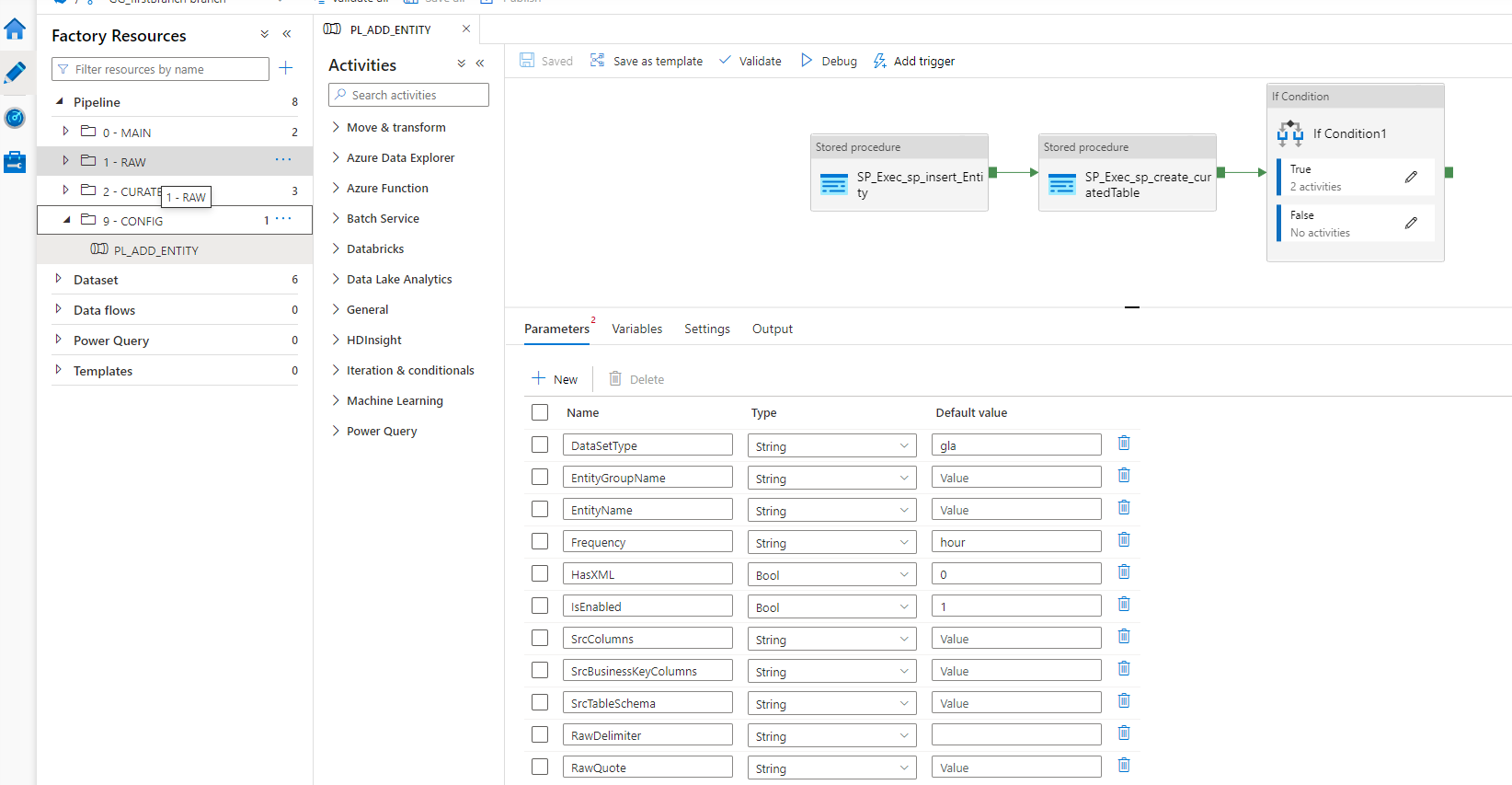
This pipeline will add the following:
- entry into configuration table - GSC_GLB_TTHardening.Conf_Entity
- new table in Curated zone
and if the entity contains any XML columns:
- new table data type
- new stored procedure with merge statement
9 Change Management and Deployment Processes
This section provides a summary of the Change Management and Deployment Processes.
Release Management is done through DevOps.
This applies to: - Database with “Incremental DB” - Azure Data Factory with “Incremental TMEC-Global release”
A release must be created in DevOps using the following:
- “Incremental TMEC-Global release” for Azure Data Factory
- “Incremental DB” for the database.
10 Overall schema
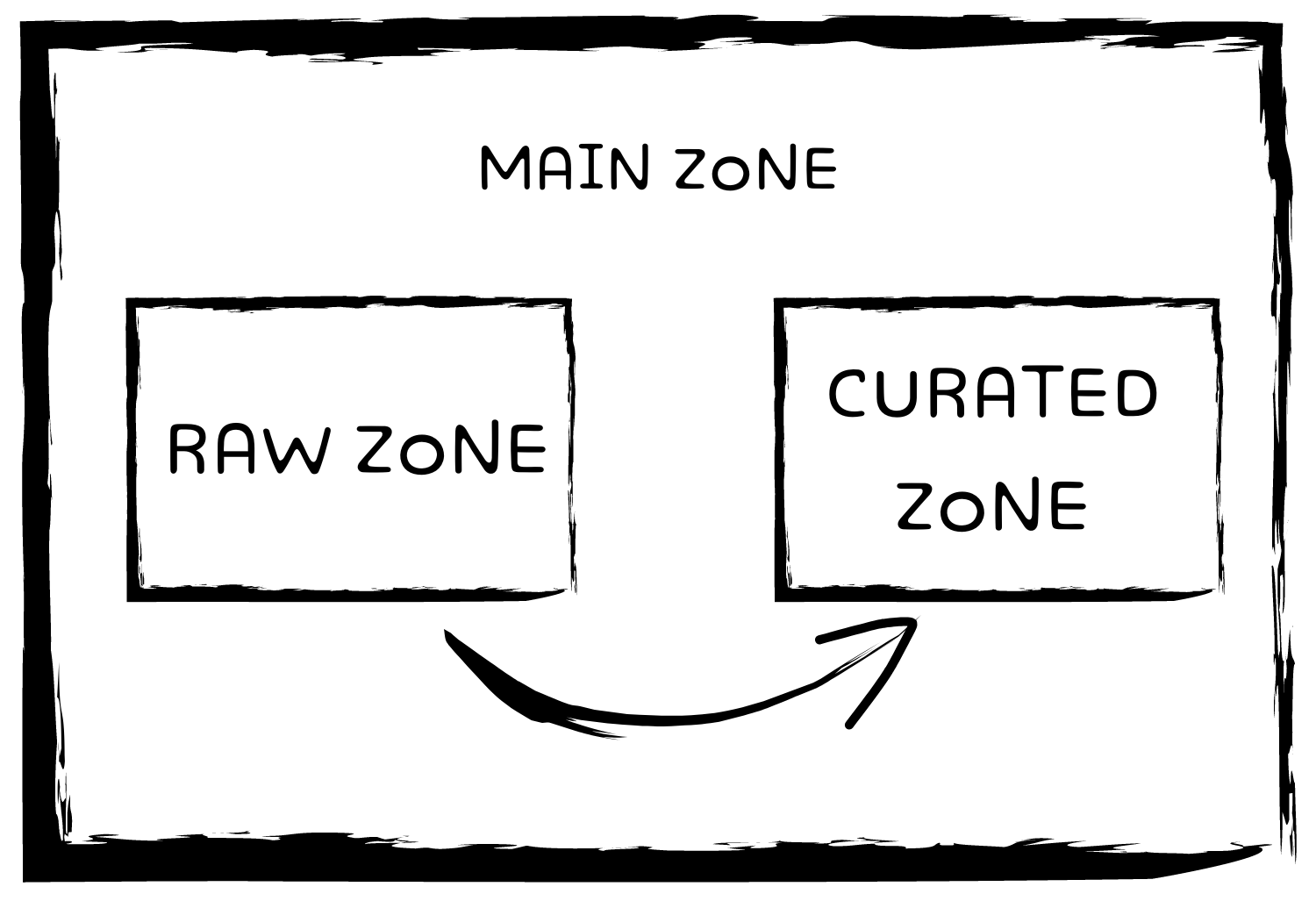
- Main zone:
- It encapsulates the “Raw zone” and “Curated zone”.
- This zone is where the triggers are set up.
- From the main zone, we trigger the process.
- Raw zone:
- The copy of the data comes from the source and ends up in the raw zone.
- It consists of the raw data directly from the source.
- Curated zone:
- Data from the raw zone gets transferred to the curated zone after it is cleaned up and arranged according to business requirements.
11 Main Zone
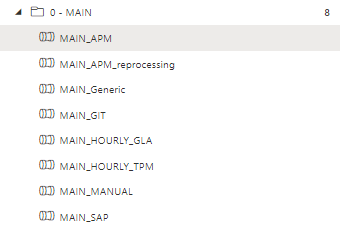
This section describes where all the extraction processes are triggered by different events and go through each execution pipeline to understand what is triggered and when.
You can see the structure in the image below:
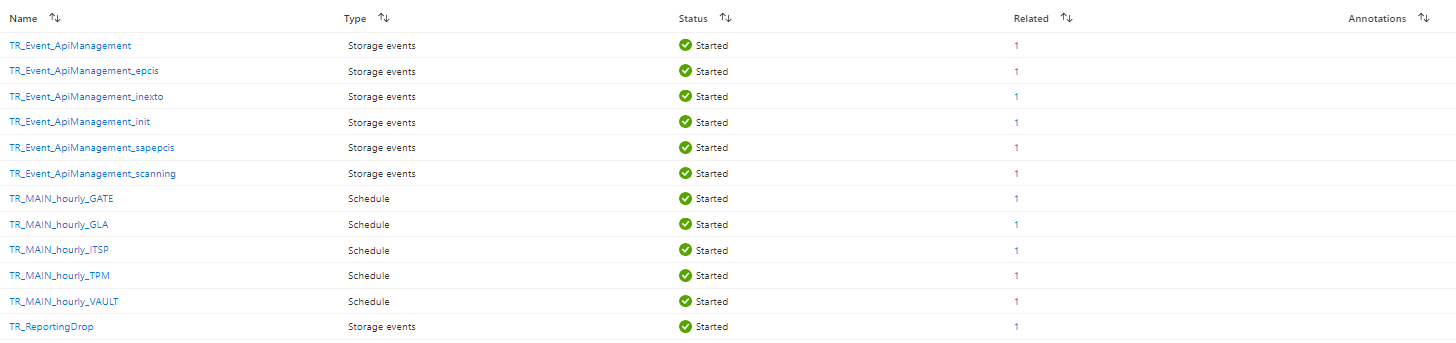
11.1 List of active triggers by types
-
MAIN_APM Triggers the APM extraction on all the 6 types:

-
MAIN_APM_reprocessing This is triggered manually only when APM reprocessing is needed.
-
MAIN_Generic This triggers GATE, VAULT and ITSP every 4 hours.

-
MAIN_GIT This is and event trigger and it starts when new .zip is uploaded to the source DevOps repository.
-
MAIN_HOURLY_GLA This triggers GLA extraction every 4 hours.
-
MAIN_HOURLY_TPM This triggers TPM extraction every 4 hours.
-
MAIN_MANUAL This triggers excel configuration data extraction when new excel document is uploaded in source container.
-
MAIN_SAP Not on trigger yet. (planned to be done)
12 RAW Zone
12.1 Pipelines
All the extractions will be used in the main principal lookup of the table value function [GSC_GLB_TTHardening].[getSqlSrcParamsRAW] has three levels of enabling in order to extract data:
-
the factory has to be enabled in [GSC_GLB_TTHardening].[SqlSrcExecParam]
-
the entity has to be enabled in [GSC_GLB_TTHardening].Conf_Entity
-
the relation entity - the factory has to be enabled in [GSC_GLB_TTHardening].[Conf_Params]
12.1.1 PL_SQL_TO_RAW_GLA
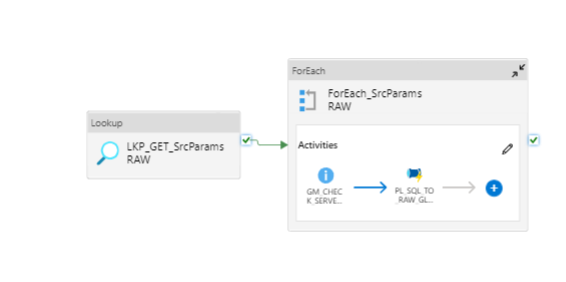
This pipeline treats the GLA data type, and it takes three parameters to function:
-
Date of format type yyyy/mm/dd
-
Frequency of type day/hour depending if it is a transactional or master table
-
Hour 24h format like 00,01,…15,16,…23
-
Factory
The first lookup LKP_GET_SrcParamsRAW will get execution parameters for GLA.
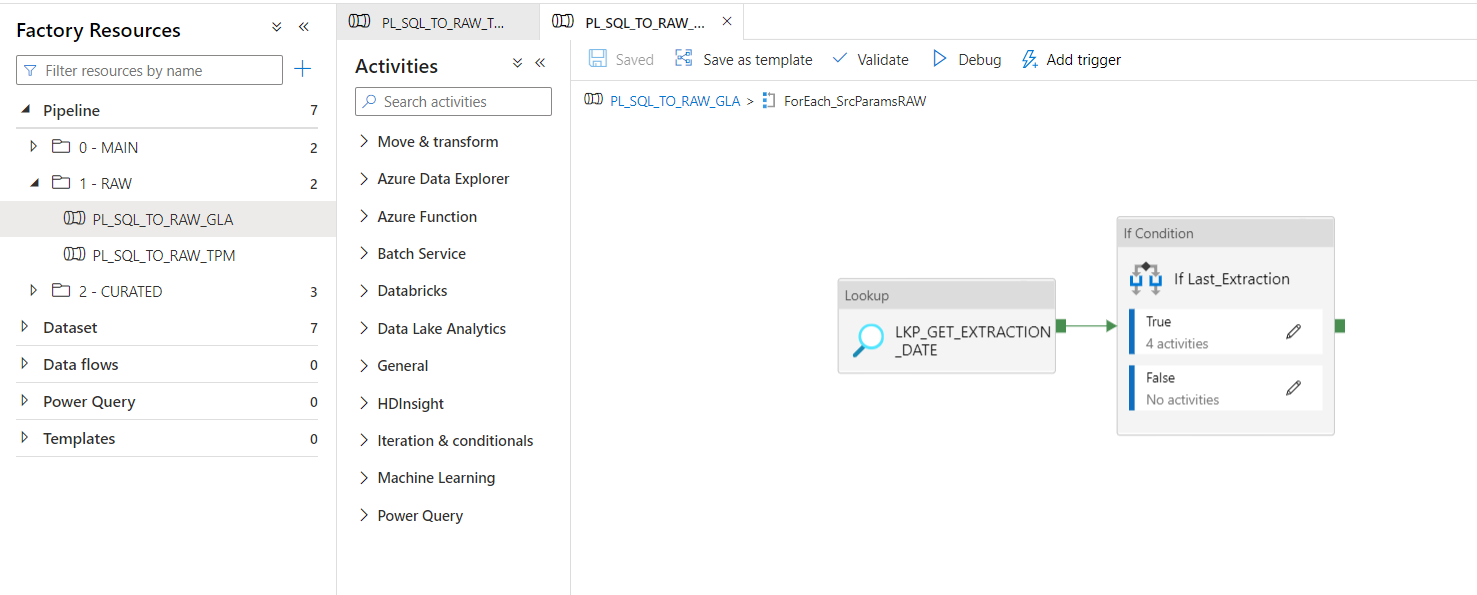
For each SqlSrcParams, we will perform two actions:
1.Check the server availability between primary and secondary 2. Run the next pipeline with the available server
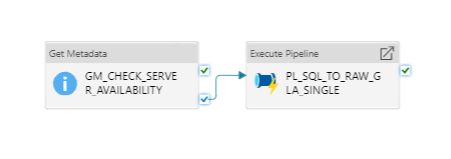
PL_SQL_TO_RAW_GLA_SINGLE
Here we analyze if there is data to be extracted.
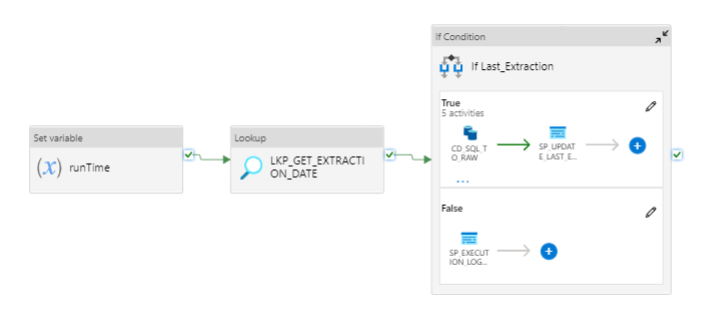
The lookup LKP_GET_EXTRACTION_DATE will replace the LastExtractionDate column from [GSC_GLB_TTHardening].[Conf_LastExtraction] with the new date that is now the latest extraction.
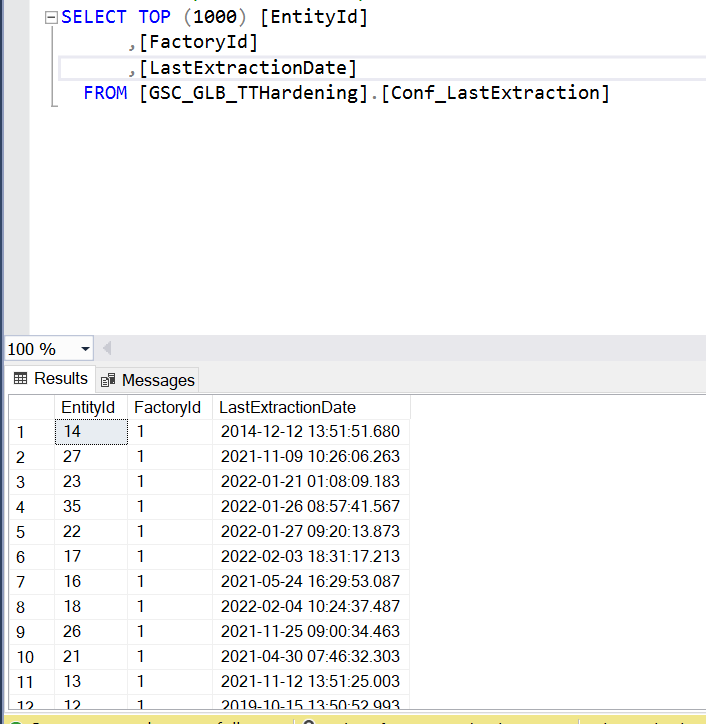
Then, in the “If” condition, it is stated that it will run only if the output for the previous lookup is not null, meaning there is something to be updated.
The last step is CD_SQL_TO_RAW where data will be taken from sandbox and put into ADLS as CSV.
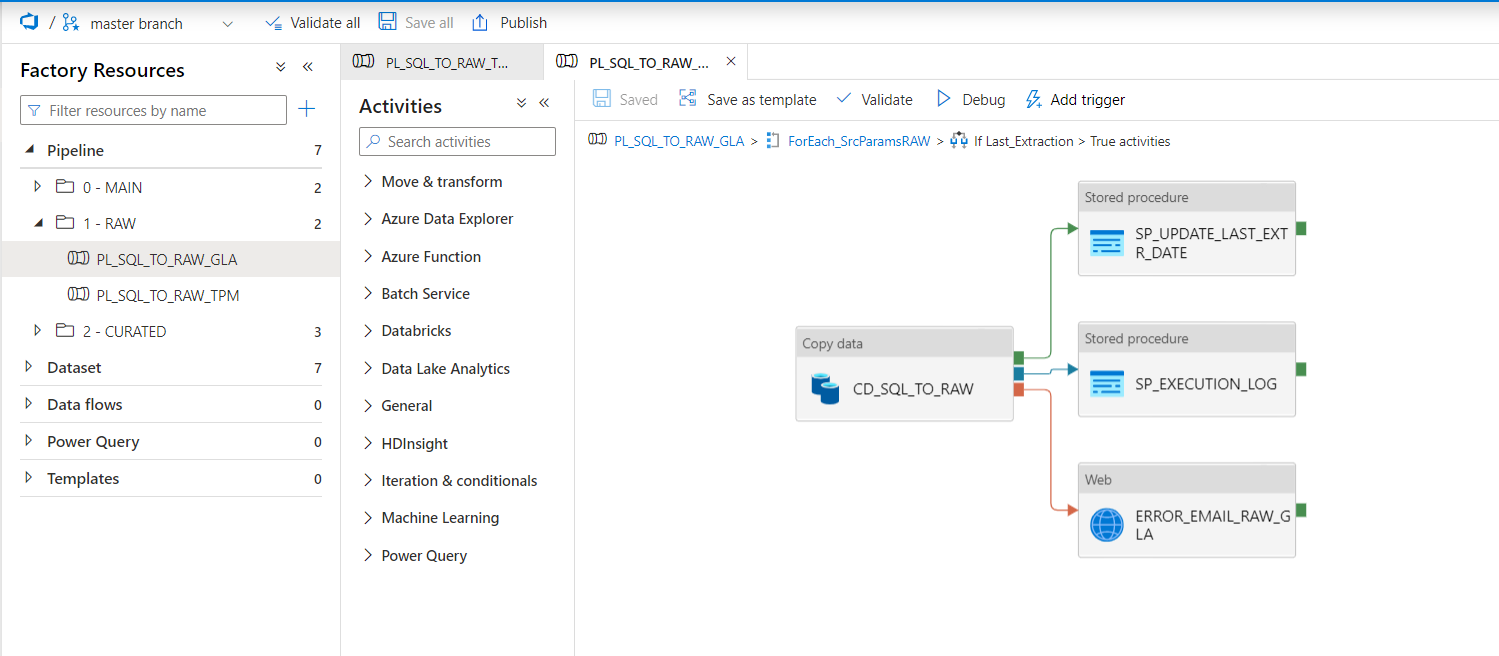
Afterward, SP_UPDATE_LAST_EXTR_DATE will update the last extraction date with the current one, SP_EXECUTION_LOG will save the log of the activity, and ERROR_EMAIL_RAW_GLA will send an email to administrators in case of failure.
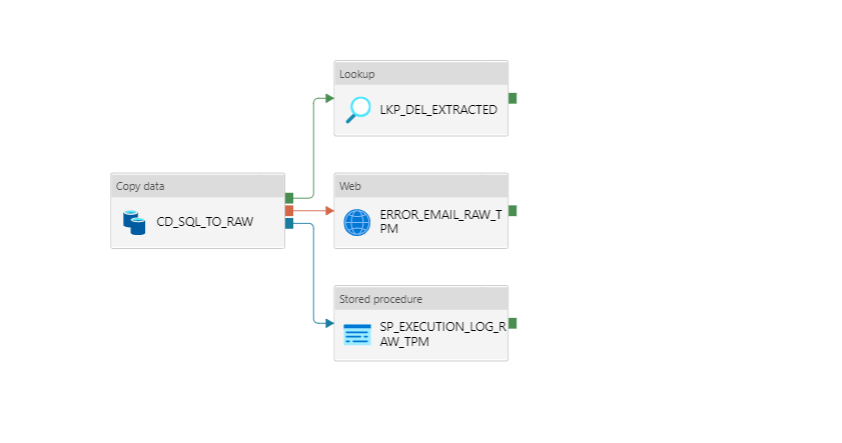
12.1.2 PL_SQL_TO_RAW_TPM
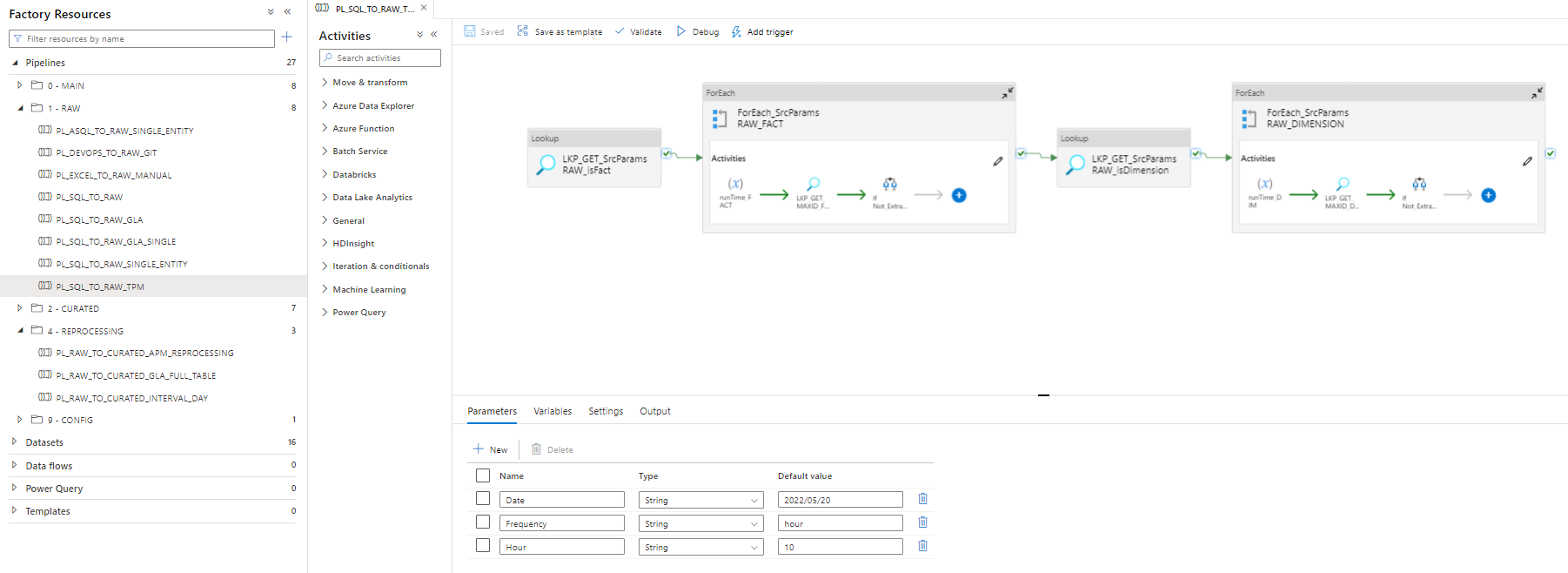
This pipeline treats the TPM data type, and it takes three parameters to function:
-
Date of format type yyyy/mm/dd
-
Frequency of type day/hour depending if it is a transactional or master table
-
Hour 24h format like 00,01,…15,16,…23
In order to get the latest data and avoid duplication, we get the max(Id) to load unique new data.
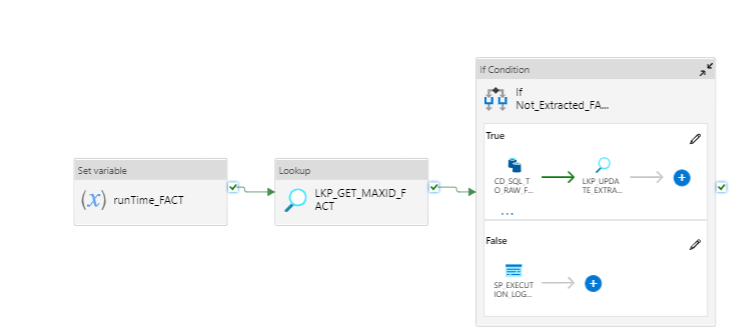
We extract first the fact tables and then the dimensions due to PK’s, after the data is placed in ADLS, the processed records are deleted from the source by using a flag in the source tables.
12.1.3 PL_DEVOPS_TO_RAW_GIT
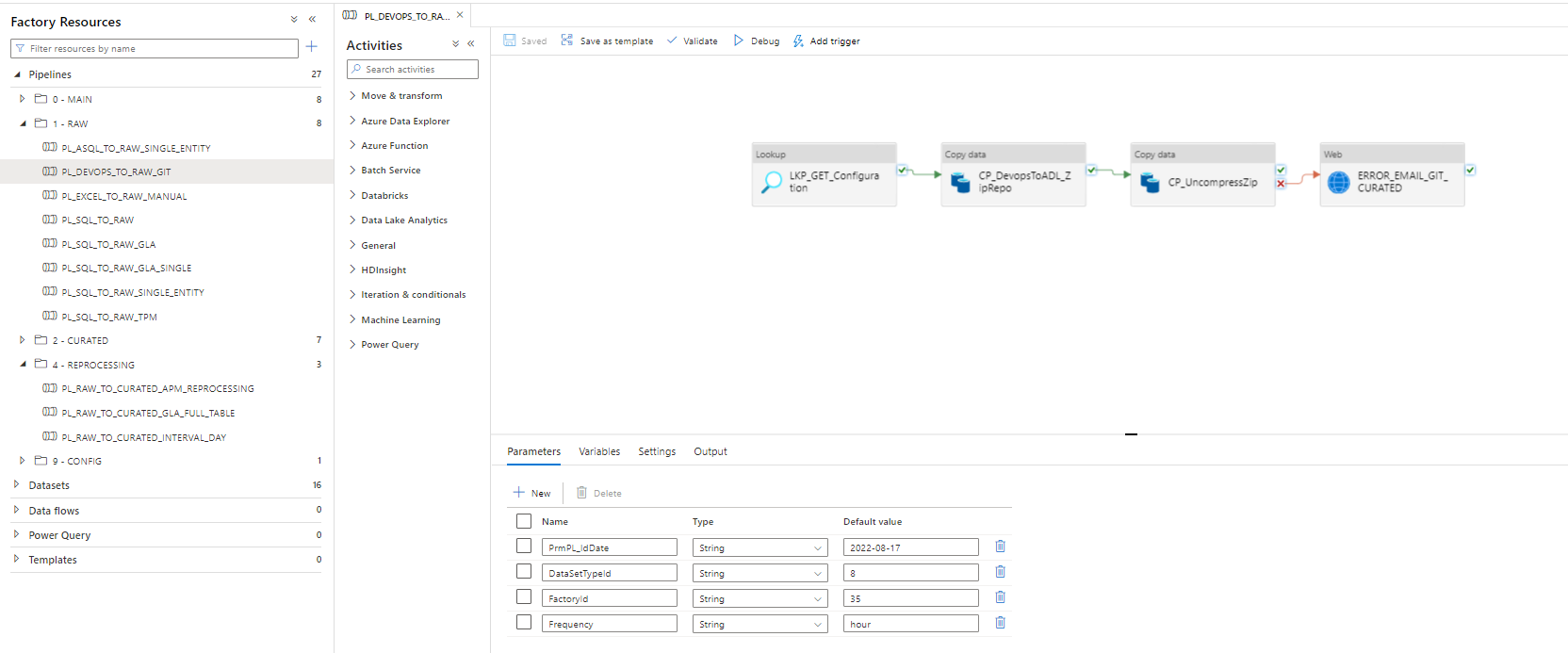
This pipeline takes the data from the source GIT Repository (Security and Database) with a copy activity that uses a dataset with compression type .zip, moves the data in the tmp container as .zip, and unarchives it in the raw container.
For the configuration,, the lookup uses an SP that gets the configuration out of the table Conf_FactoryProperty.
12.1.4 PL_SQL_TO_RAW
This is the Generic pipeline where data from MSSql and Asql is handled, for the moment, we have on it: VAULT, GATE, and ITSP.
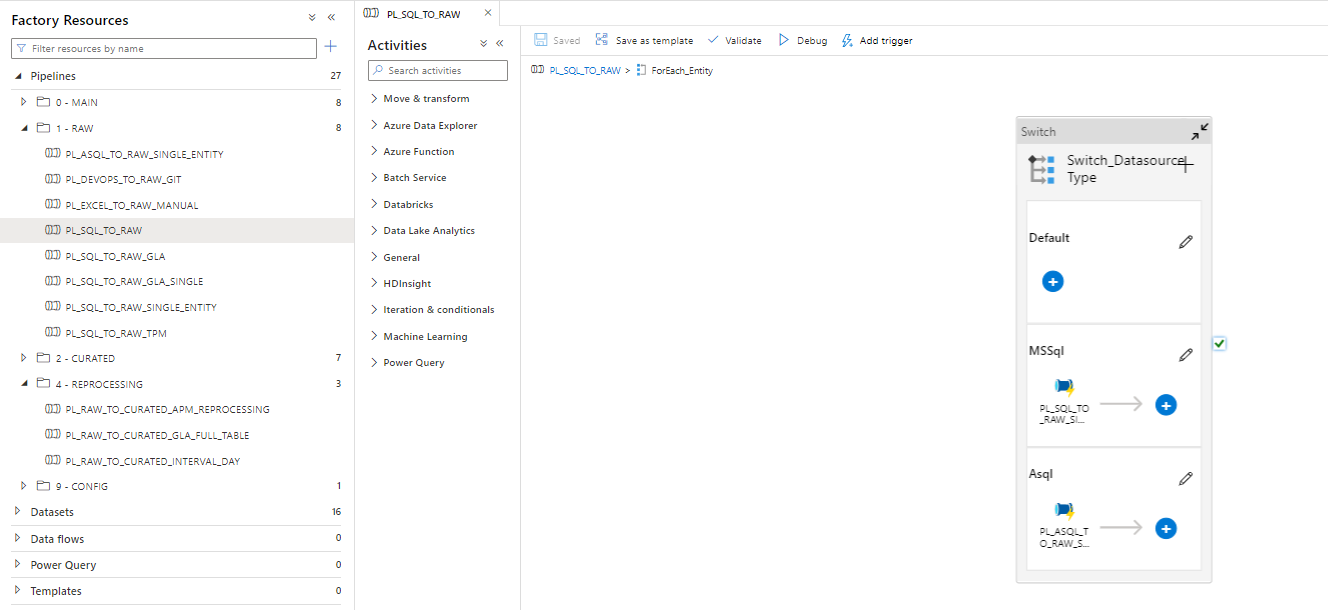
This pipeline calls either PL_SQL_TO_RAW_SINGLE_ENTITY or PL_ASQL_TO_RAW_SINGLE_ENTITY* to load the data from the source to RAW. Data is saved as CSV, and in addition to the columns, we add the “_PlantId” and “_ExtractionDate” columns that are used for merging in curated ADLS(_PlantId) and for partition of the delta table (_ExtractionDate).


In both cases, the process of extraction is as follows:
-
Set the start time of the execution, used for startDate on execution_log when no data is copied.
-
Extract entity properties needed to ingest in raw.
-
Check server availability
-
Set the server that responds to be used -if it is the case.
-
Check if exists Watermark Query
-
If the last extraction is earlier than the currentRun, then there is new data.
-
Update the CurrentWatermark to know what was extracted, not to get it again.
12.1.5 PL_EXCEL_TO_RAW_MANUAL
Details are explained in the “Configuration of Manual (Excel)” section, later in this document.
13 Curated Zone
13.1 Pipelines
13.1.1 PL_RAW_TO_CURATED_TPM
In this pipeline we extract the data from CSVs and put it in curated ASQL as parquet.
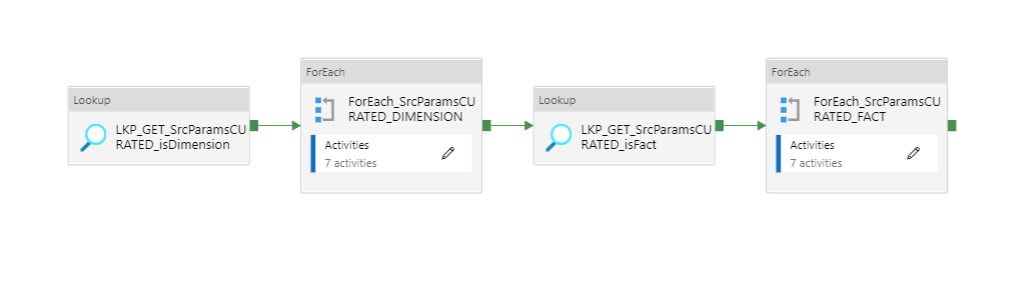
The first lookup makes use of the stored procedure sp_get_SqlSrcParamsCURATED_isDimension that provides the configuration details needed for the extraction of tables that are dimensions.
After, the second lookup will make use of the sp_get_SqlSrcParamsCURATED_isFact that will load all the fact tables.
This way, we ensure that we will not have conflicts with the FK and PK.
The parameters provided to the lookup stored procedure are the date and the hour.
Writing in ADLS process is performed once again by using BDR_RAW_TO_CURATED_DELTALAKE notebook, having the date of process as the delta partitioning key.
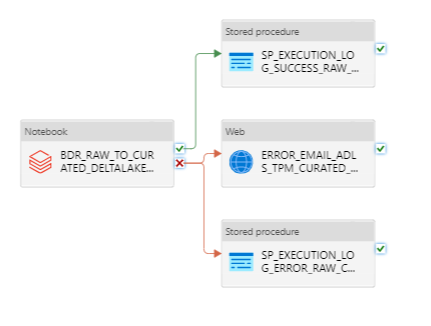
The Databricks notebooks are followed by stored procedures used for logging the messages of failure/success and by a web activity for sending email notifications in case of pipeline errors.
13.1.2 PL_RAW_TO_CURATED_DBR
In this pipeline we extract the data from CSVs for GLA and put it in curated ASQL as parquet.
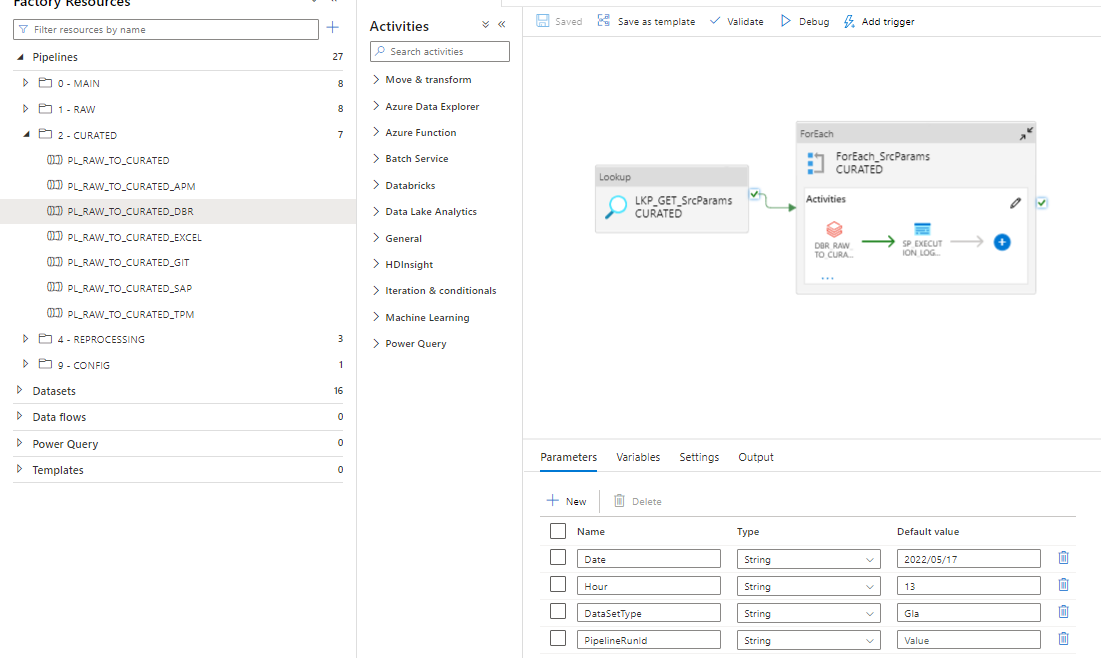
In the first lookup we get execution parameters for extracting data from RAW to Curated.(GLA)
Then, for each source parameter in the for each we execute the Databricks notebook MoveToCurated that copies the data from Raw to Curated ADLS in parquet format and partition it by day using _ExtractionDate parameter.
The Databricks notebooks are followed by stored procedures used for logging the messages of failure/success and by a web activity for sending email notifications in case of pipeline errors.
13.1.3 PL_RAW_TO_CURATED_GIT
This pipeline takes the data from raw as csv and using a Databricks notebook( MoveToCurated-GIT ) and writes the data in curated under parquet format.
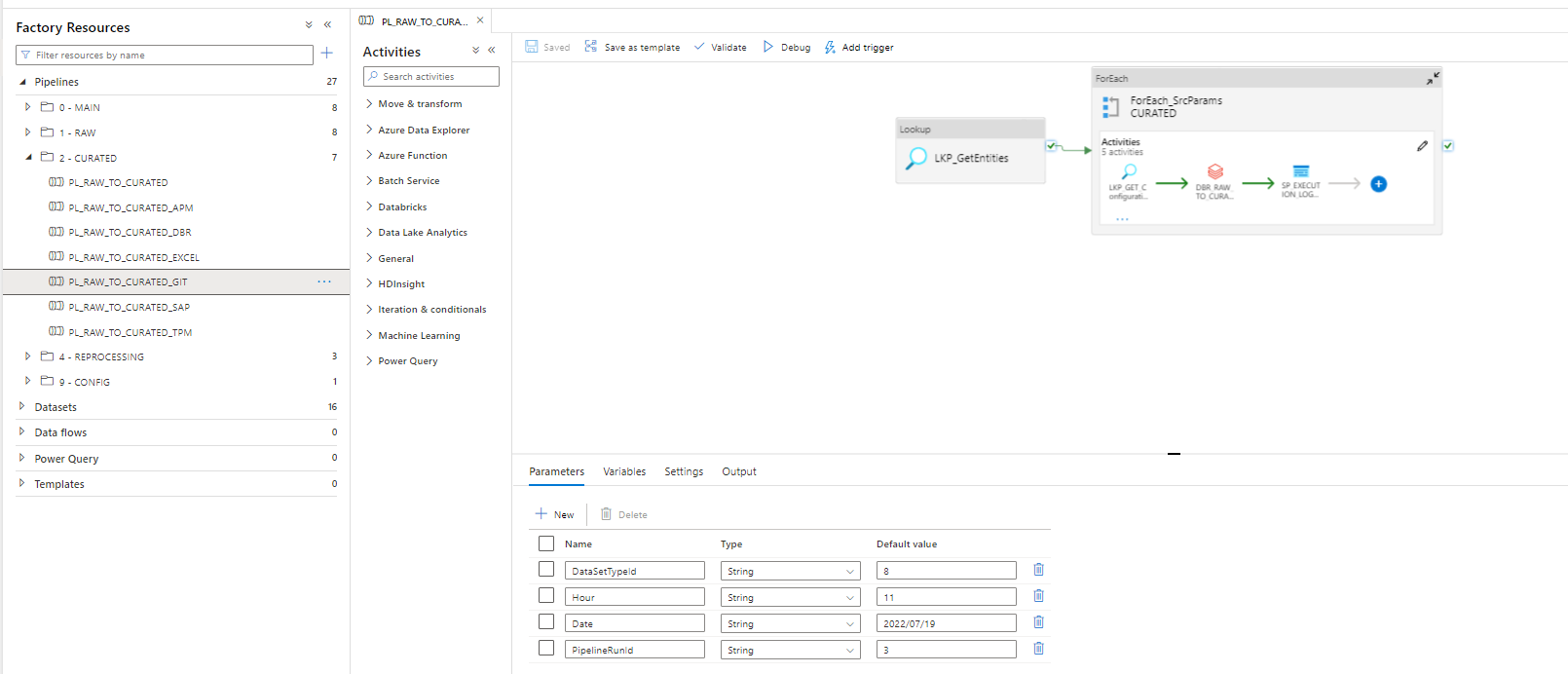
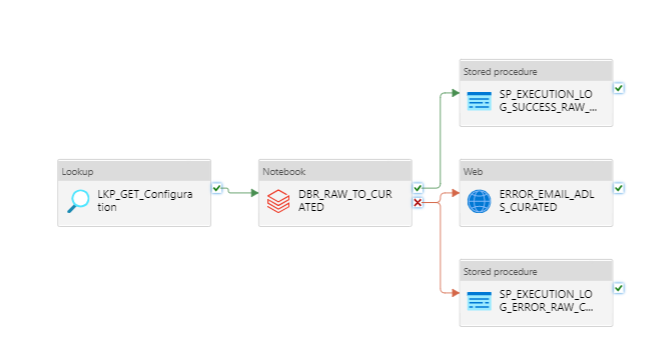
The Databricks notebooks are followed by stored procedures used for logging the messages of failure/success and by a web activity for sending email notifications in case of pipeline errors.
13.1.4 PL_RAW_TO_CURATED
This is the generic curated pipeline that at this moment handles VAULT, GATE and ITSP.
It is taking data from RAW(csv) and puts it in Curated ADLS as parquet, partition by _ExtractionDate.
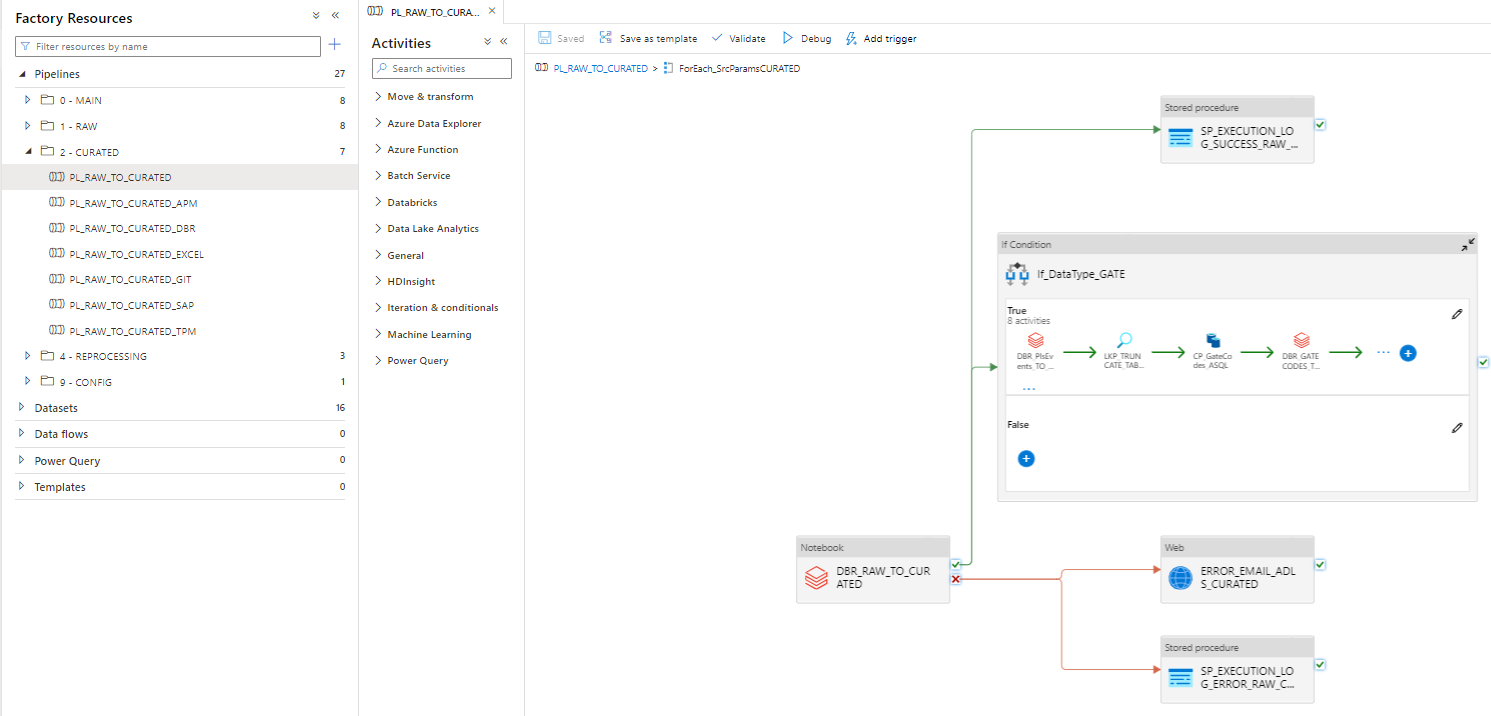
For the merge we are using the Databricks notebook: MoveToCurated-Generic
In addition, on the merge we add the system columns at it follows:
-
_PeriodInsert - time of the pipeline when an insert happens
-
_PeriodUpdate - time of the pipeline when an updatehappens
-
_RunIdInsert - the run Id of the pipeline on insert
-
_RunIdUpdate - the run Id of the pipeline on update
-
_TsInsert - time of the databricks notebook on new insert
-
_TsUpdate - time of the databricks notebook on new update
If the data set type is GATE we treat us as a separate case as the process is as follows:
-
Extract Gate Codes using dbr notebook
-
TRUNCATE table [GSC_GLB_TTHardening_GATE].[GateXmlCodes]
-
Copy the codes form csv to ASQL using SP
-
Delete the CSV were we temporary saved the codes
-
execute Move_GateCodes_Curated_ADLS
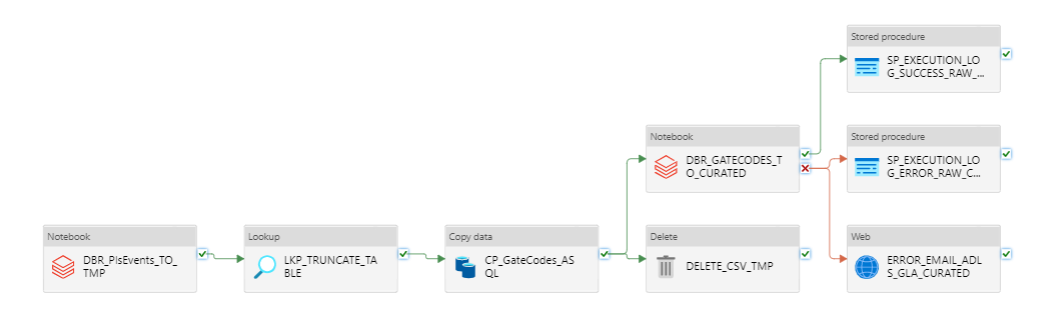
The Databricks notebooks are followed by stored procedures used for logging the messages of failure/success and by a web activity for sending email notifications in case of pipeline errors.
13.1.5 PL_RAW_TO_CURATED_SAP
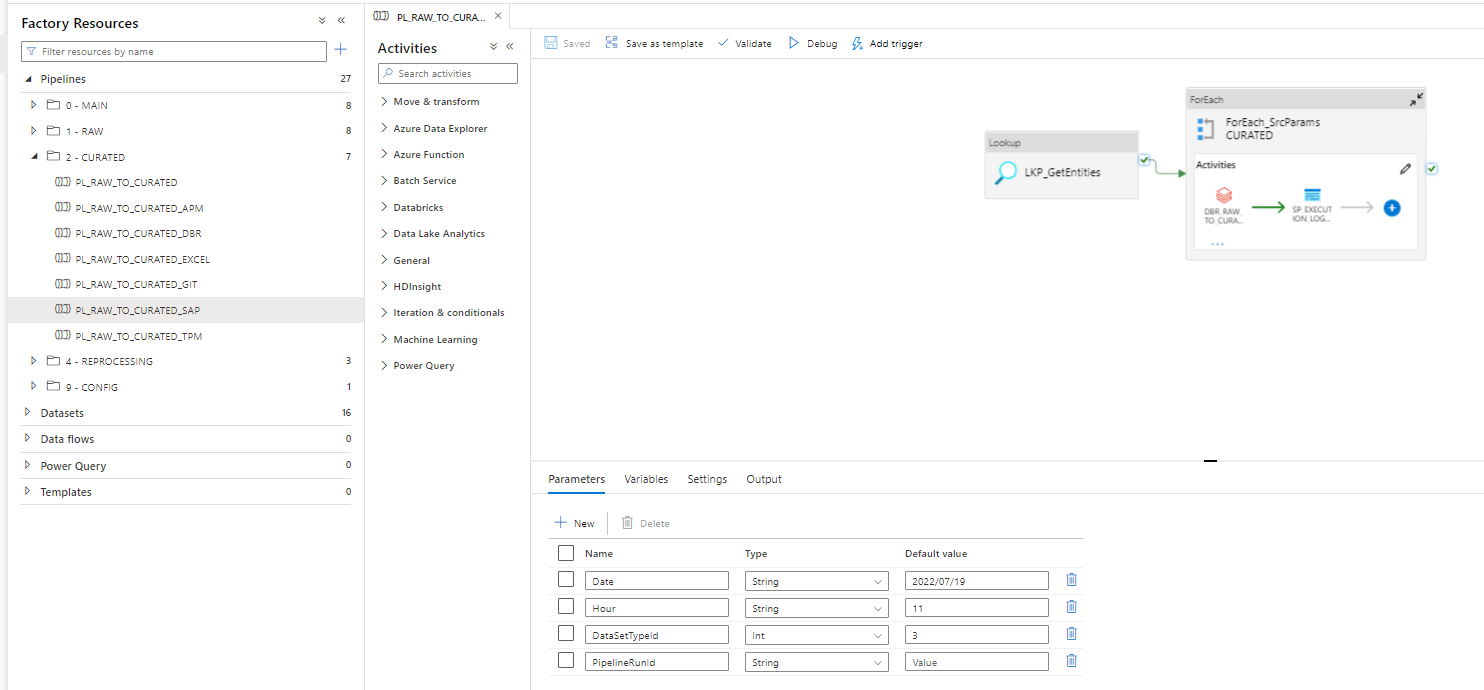
The first lookup gets the entities to be moved from raw to curated.
Copy data from Raw to Curated ADLS in parquet format and partition by day using the notebook MoveToCurated-SAP.
The Databricks notebooks are followed by stored procedures used for logging the messages of failure/success and by a web activity for sending email notifications in case of pipeline errors.
13.1.6 PL_RAW_TO_CURATED_EXCEL
Details are explained in the “Configuration of Manual (Excel)” section later in this document.
13.1.7 PL_RAW_TO_CURATED_APM
Details are explained in the “External APIs” section later in this document.
14 Configuring Manual Data
14.1 Where to upload the data
Data will be uploaded in ADLS under the file GSC/Global/TTHardening/Cost/YYYY-MM-DD/ as “.xlsx” file with the sheets:

Make sure to create a new folder under GSC/Global/TTHardening/Cost/ with format YYYY-MM-DD and there to upload the new file.
Example:

14.2 Data format of the Excel sheet
Data will be uploaded as one xlsx file with sheets named:
Column names in each sheet will be as follows:
Continents

JTI Regions
Countries

Cost

Regulation to Country to MG

Country to Market

Exchange Rates

14.3 Data format
Data will be extracted as soon as the excel document will be uploaded and it will take about 5 minutes until the data can be seen in the synapse views.
15 Reprocessing Zone
These pipelines will be executed manually when reprocessing data is needed.
They are not part of the extraction process, just reprocessing tools if needed.
Structure:

15.1 PL_RAW_TO_CURATED_APM_REPROCESSING
Reprocessing tool for APM process between 2 given dates as input.

This will take the data from RAW to JSON, and if there is data to be reprocessed, it will be written under delta format.
The given run date must respect that template.
15.2 PL_RAW_TO_CURATED_GLA_FULL_TABLE
This pipeline was developed to reprocess a full GLA table by deduplicating the data as at some point we had problems with duplicated values coming from different factories.

It takes as a parameter only the entity we want to duplicate.
15.3 PL_RAW_TO_CURATED_INTERVAL_DAY
This pipeline was developed mainly for TPM and GLA data types to reprocess the data between a given interval.

The run parameters for data set type or entity list can be found in MSSQL.
The given run dates must respect that template.
For the best performance, 15 days interval is recommended to be used to avoid out of memory errors.
16 External APIs
16.1 API Management
16.1.1 RAW zone
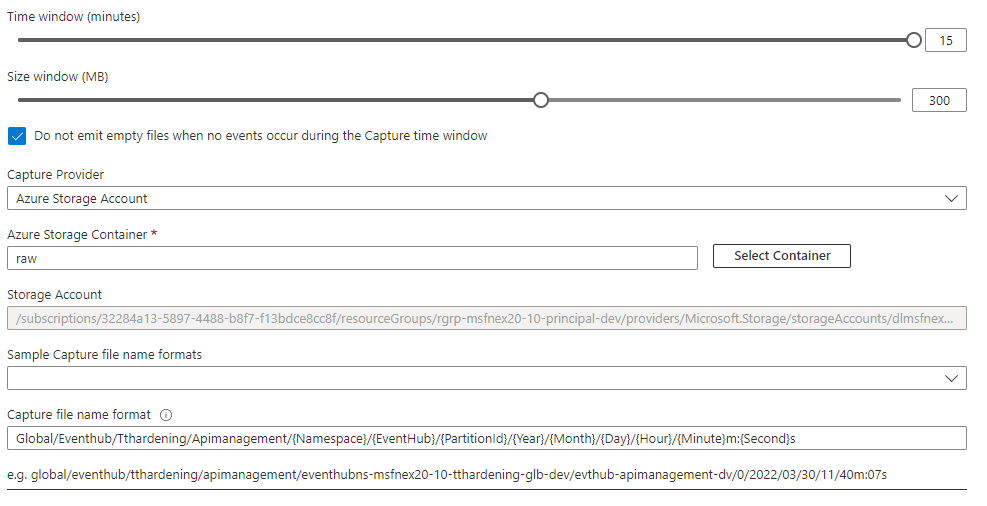
In order to capture real-time information from this API, we are using six different Azure Event Hubs as follows:

(the same Event Hubs are configured for all the environments: DEV, QA, PROD )
, having the configuration as follows:
17 Document control
17.1 Document Owner
The owner of this document is Robert Brenebel.
17.2 Contact person
Questions and feedback regarding this standard should be submitted to Robert Brenebel.
17.3 Revision History
| Version | Effective date | Purpose of change | Author |
|---|---|---|---|
| 1 | 14-Feb-2022 | First version of the document | Brebenel Robert |
18 References
References will be added here when necessary.
ANY QUESTIONS?