IT TT Operational Excellence Control KPIs
Version: 1, effective date: 20-Jun-2022
Contents
-
6 List of IT TT OEC KPIs Reports With Parameters and Definitions
- 6.1 DMND - Start Date is in the past
- 6.2 DMND - Not Analyzed in 14 days
- 6.3 CHG - Not approved in 1 month
- 6.4 CHG - Target Completion Date already passed
- 6.5 INC - Not updated in the past 7 days
- 6.6 INC - Not closed in 25 days
- 6.7 PRB - Root Cause is not identified in 30 days
- 6.8 PRB - Not worked over 21 days
- 6.9 PRJ - Not updated in the past 30 days
1 Standard Description
The purpose of this Standard is to set the guidelines for the application of Operational Excellence Control KPIs for IT BTS-TT and GDC-TTDC teams.
This standard is an extension of global standards and is based on the global KPI metrics.
Its aim is to improve the performance of IT teams supporting the Track and Trace process.
2 Document Objectives and Benefits
2.1 Objectives
The objective of this document is to provide a definition of IT TT OEC KPIs and the process of how are they applied and followed.
2.2 Benefits
The benefits of the IT TT OEC KPIs tracking are the following:
-
To comply with corporate IT policies
-
To ensure a high level of service to our customers
-
To ensure continuous improvement of data quality
-
To reach our operational objectives
3 Definitions
| Abbreviation / Term | Explanation |
|---|---|
| T&T | Track and Trace |
| OEC | Operational Excellence Control |
| KPI | Key Performance Indicator |
Please refer to IT Glossary in the IT P&P portal for further definitions.
4 Roles & Responsibilities
Accountable: Approves the activity or recommendations from a person or team.
Responsible: Responsible to do the work associated with an activity, either by completing personally or through sole accountability for a team’s output.
Consulted: Reviews the output of an activity and provides input, but has no approval authority. Provides support to activity and may be consulted by the team during the course of the activity.
Informed: Is informed about activities to aid in planning own work.
| # | Activity | IT TT Directors | IT PMO | IT TT BTS analyst | GDC-TTDC analyst |
|---|---|---|---|---|---|
| 1 | Define and maintain standard | A | R | I | I |
| 2 | To follow up on individual KPI components | I | I | R | R |
| 3 | To reflect accumulated KPI results into PPA | A/R | C | C |
5 Types of Activities Tracked in Reports
All the reports can be divided into two following types of activities:
Analysis – a group of activities that includes business and technical analysis, alignment, coordination and etc. Implied to require lower efforts.
Follow up – activities that are focused on the communication and reporting of status. Implied to require lower efforts.
| Control | Activity type |
|---|---|
| CHG - Not approved in 1 month | Analysis |
| CHG - Target Completion Date already passed | Follow up |
| DMND - Not Analyzed in 14 days | Analysis |
| DMND - Start Date is in the past | Follow up |
| INC - Not closed in 25 days | Analysis |
| INC - Not updated in past 7 days | Follow up |
| PRB - Not worked over on 21 days | Follow up |
| PRB - Root Cause is not identified in 30 days | Analysis |
| PRJ - Not updated in the past 30 days | Follow up |
6 List of IT TT OEC KPIs Reports With Parameters and Definitions
All reports in the list are created with the linkage to IT Operational Dashboard containing KPI reports which are globally used for IT units.
The list of the OEC KPIs contains the following reports:
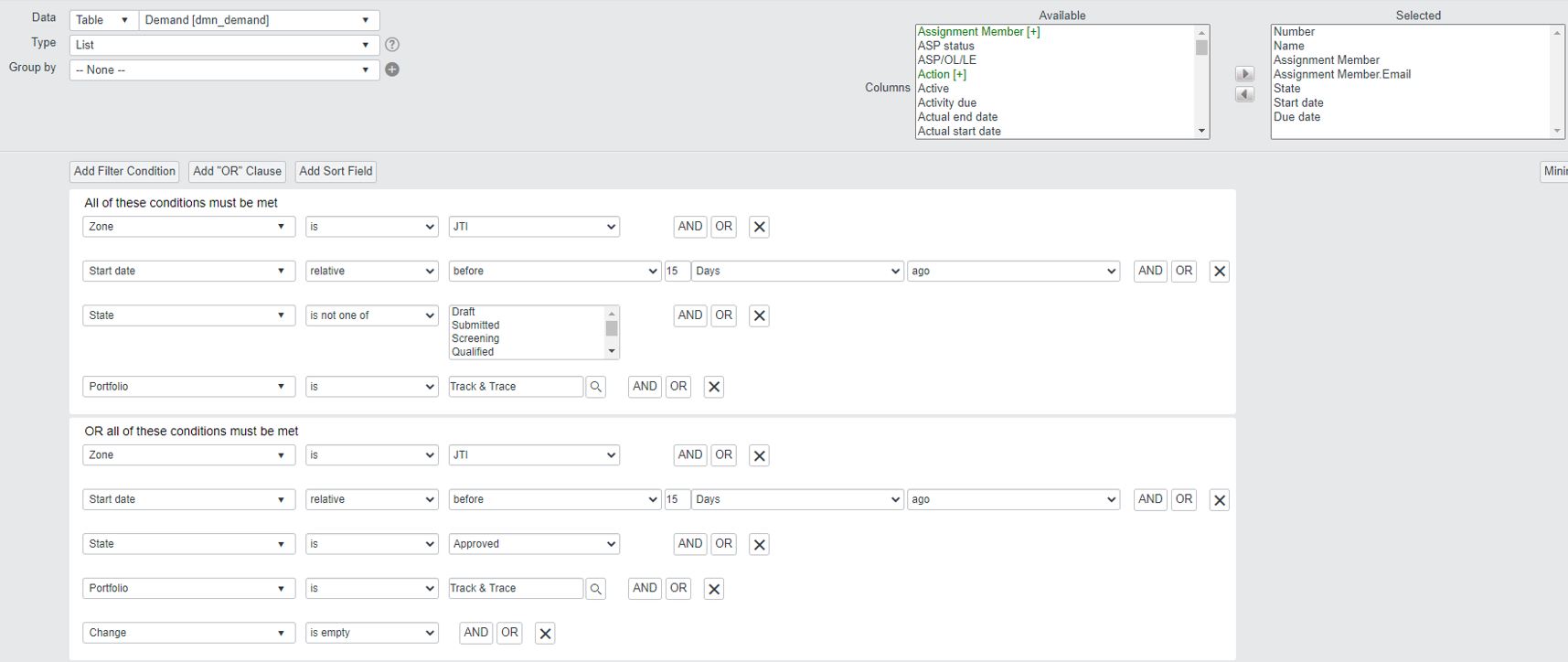
6.1 DMND - Start Date is in the past
This report shows active approved demands with a start date relative before 15 days ago.
Helps to track the in-time start of the projects and avoid delays in committed timelines of project’s implementation.
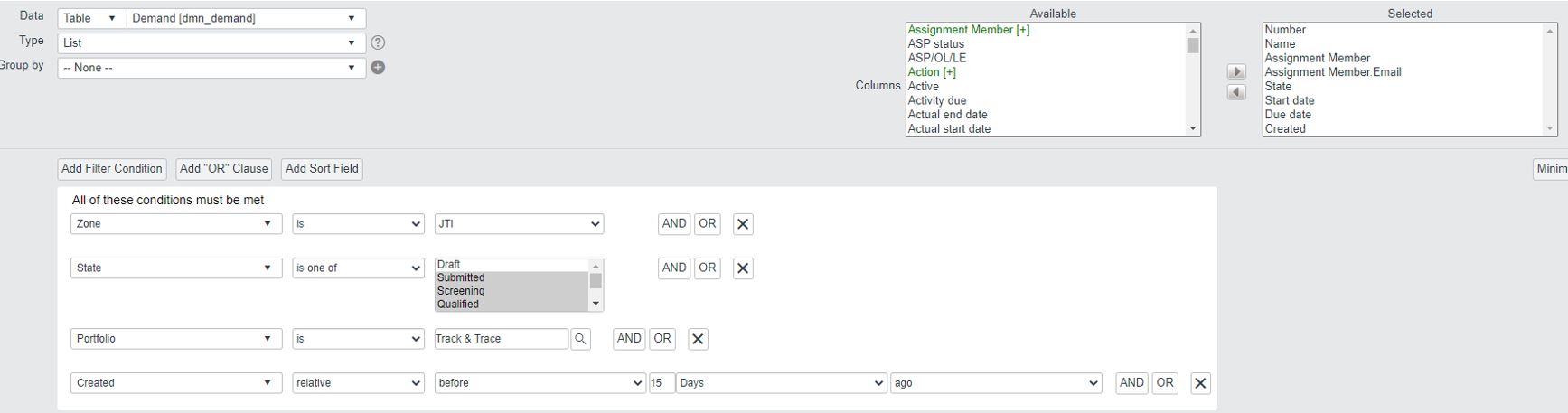
6.2 DMND - Not Analyzed in 14 days
This report shows a list of demands approved by business (Submitted state) but not sent for approval for more than 14 days
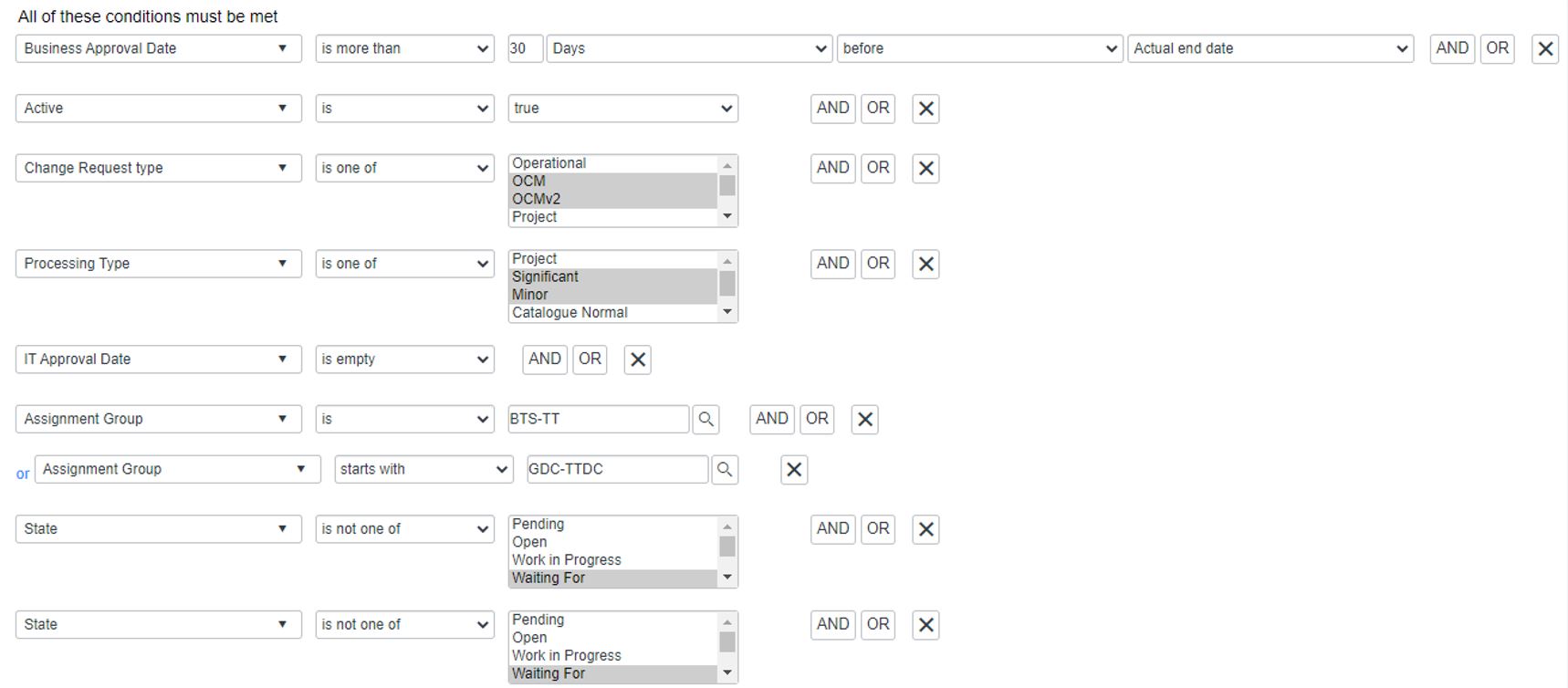
6.3 CHG - Not approved in 1 month
This report shows non-routine Change Requests which were not approved within 30 days starting from the Creation date.
This control helps to control and prevent the delays in committed timelines of the project’s implementation
The end date of the approval is the IT approval date.
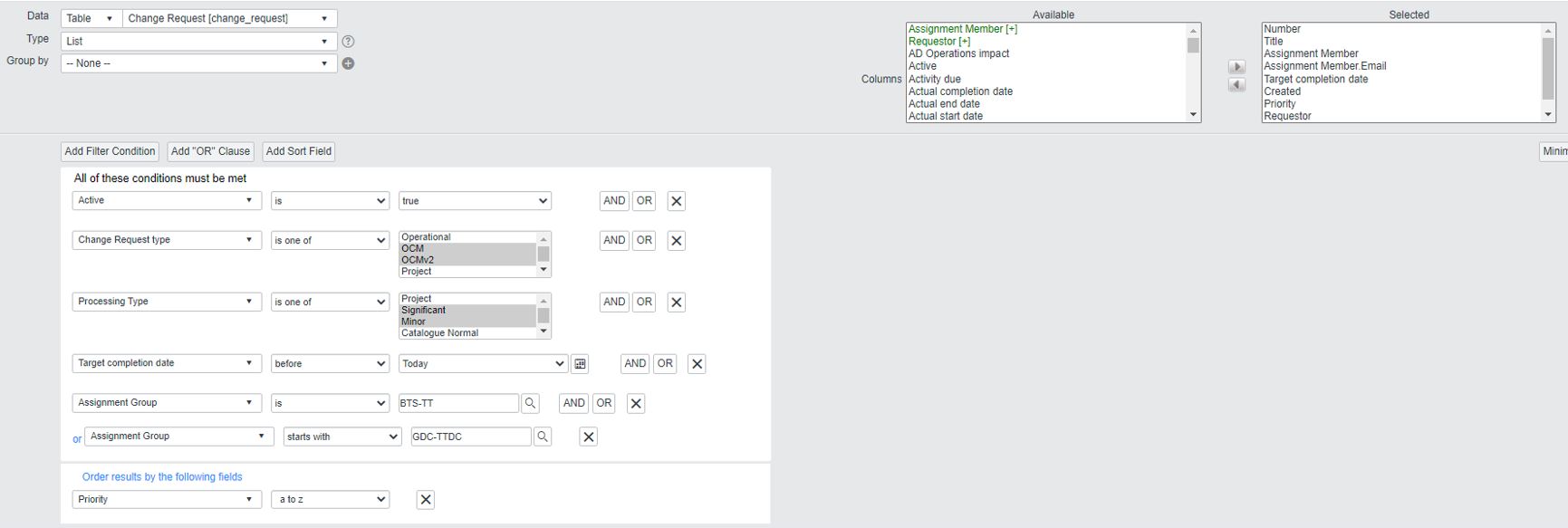
6.4 CHG - Target Completion Date already passed
This report shows non-routine Change Requests with a target completion date in the past which helps to control and track Change Requests which may be delivered with a delay.
The absence of such items should help to increase the quality of the process by in-time delivery and proper time and resource planning
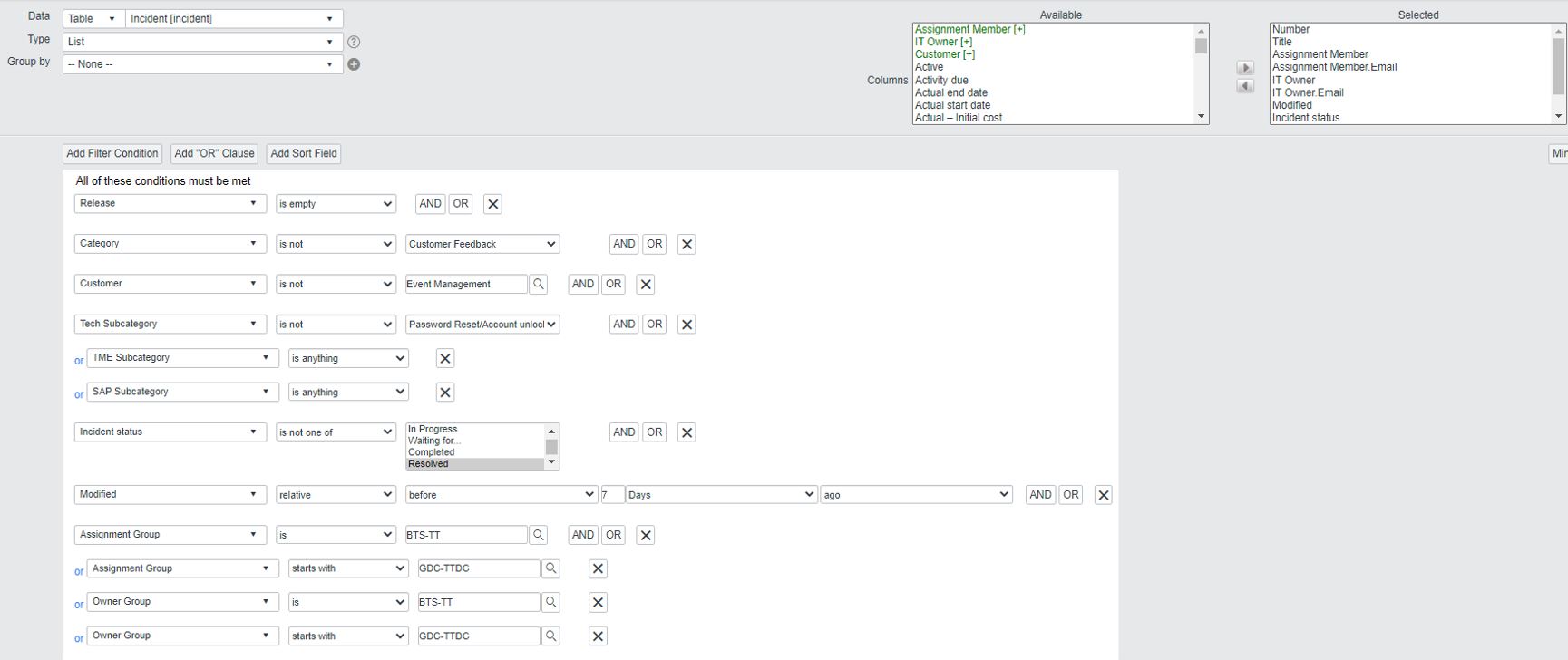
6.5 INC - Not updated in the past 7 days
This report shows incidents that have no updates for 7 days.
The regular update helps to improve and increase the quality of service
6.6 INC - Not closed in 25 days
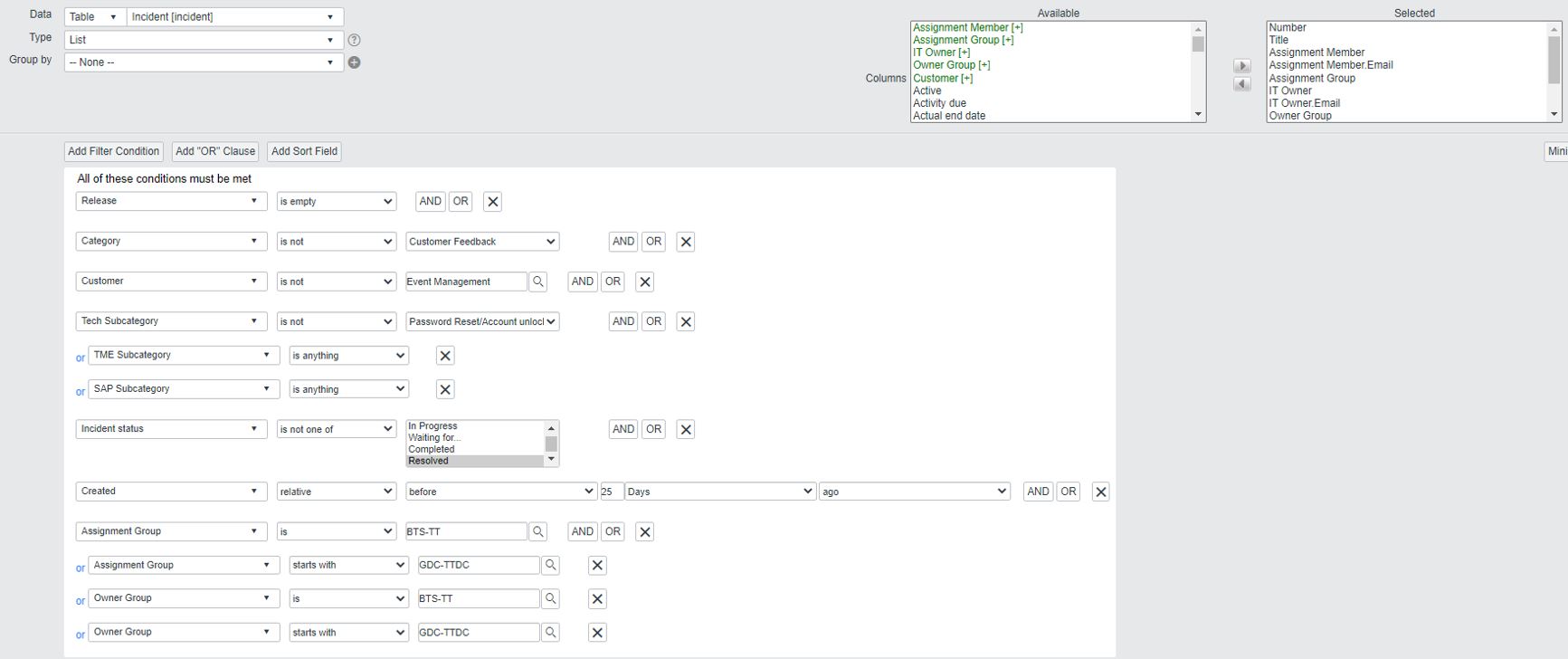
This report shows incidents that were not closed for 25 days.
This means that no solution or workaround was proposed during this period.
In-time closure of incidents helps to improve and increase the quality of service
6.7 PRB - Root Cause is not identified in 30 days
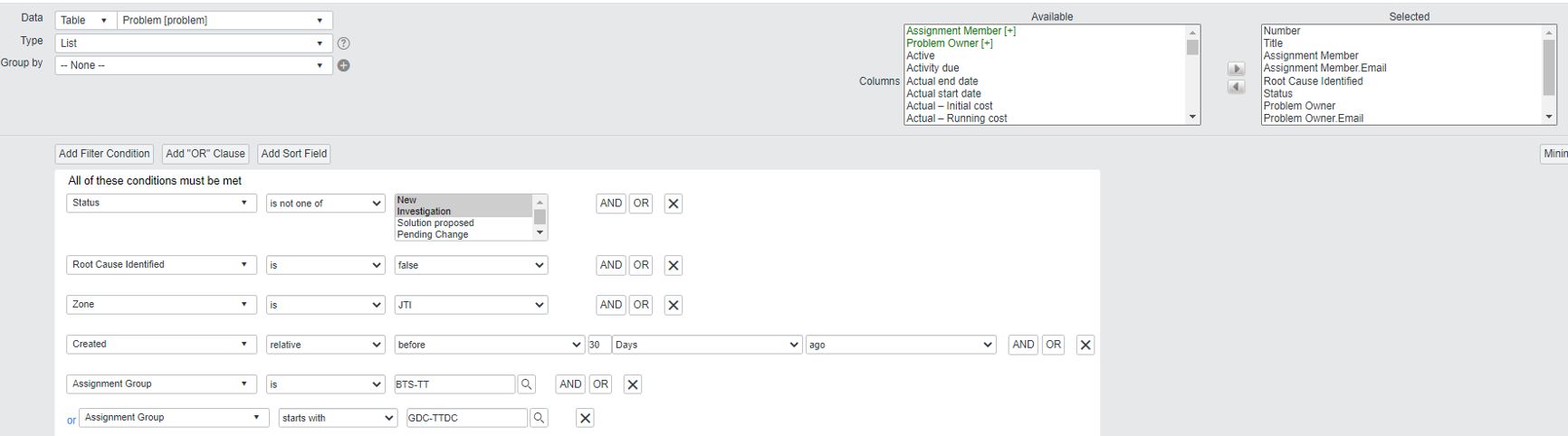
This report shows problems created 30 days ago with root cause not identified, which means that the tick in the field “Root Cause Identify” is missing.
In this case, both the owner and the assignment member will get a penalty point
6.8 PRB - Not worked over 21 days
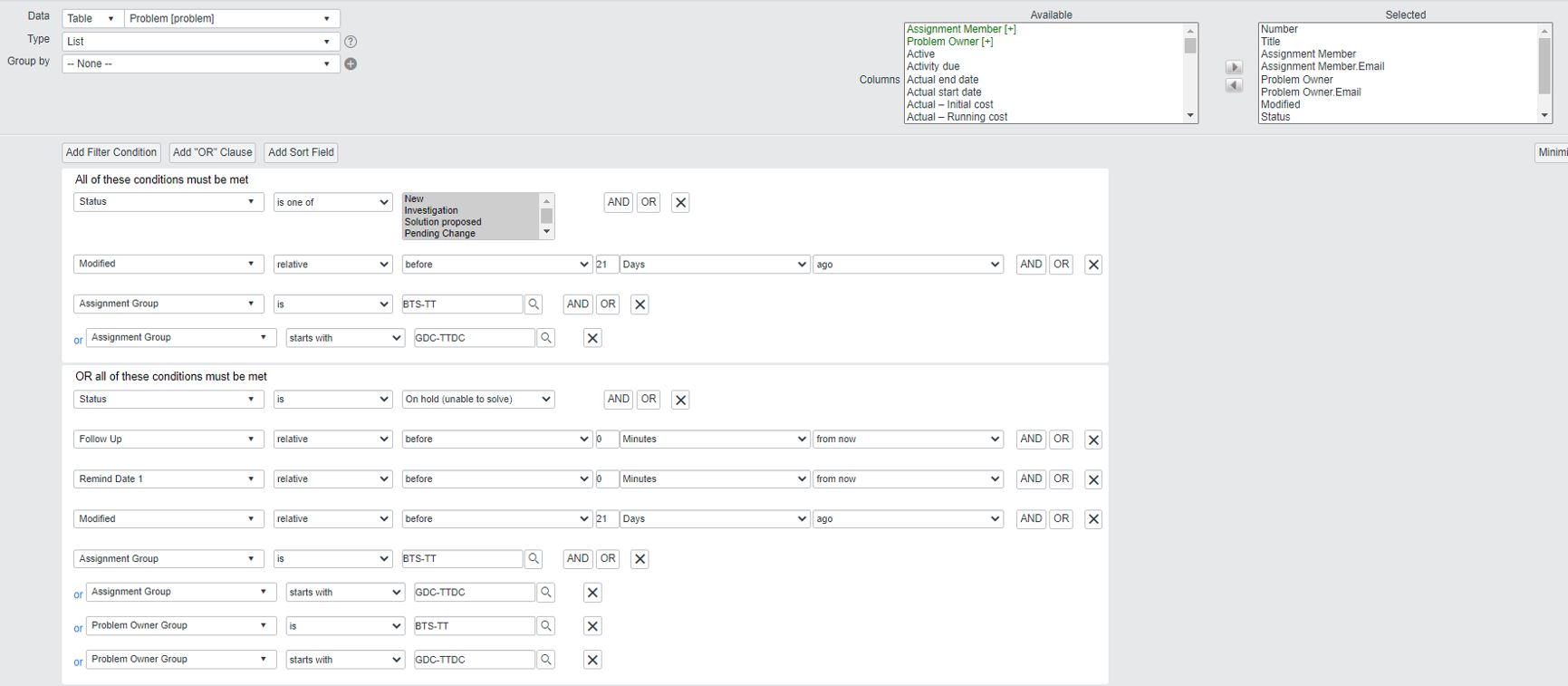
This report shows that Problem was not modified for 21 days.
In this case, both the owner and the assignment member will get a penalty point.
This report helps to control the solution of problems in time
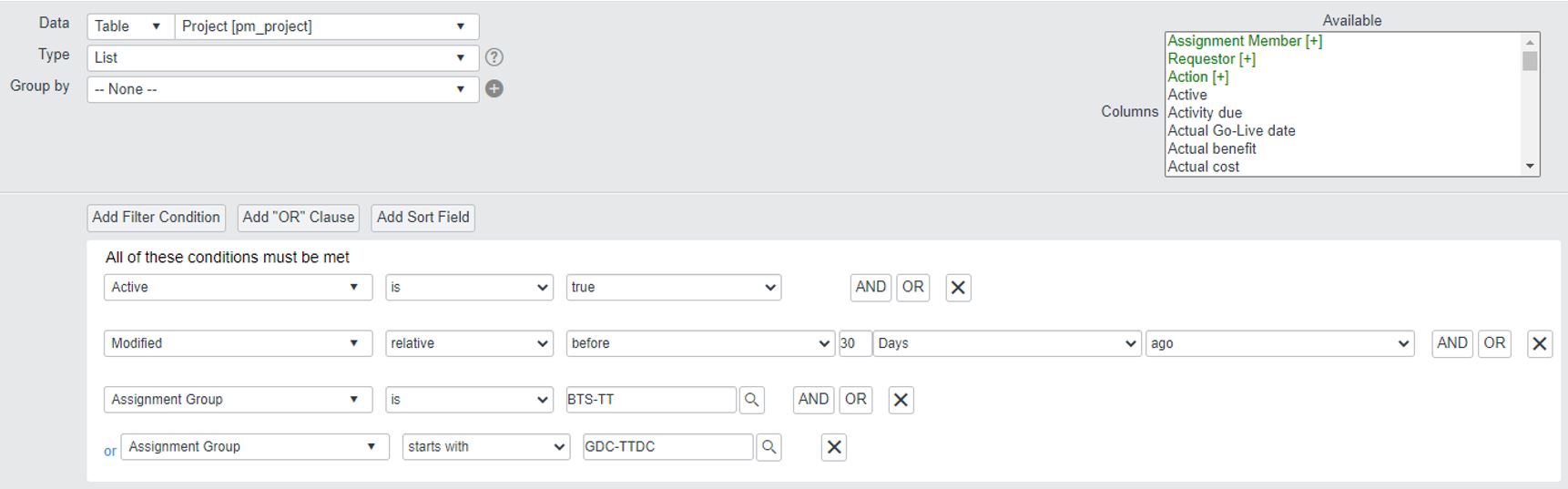
6.9 PRJ - Not updated in the past 30 days
This report shows projects that had no updates for 30 days
7 IT TT OEC KPIs Follow Up and Control Process
The objective of the KPI follow-up process is to support a certain level of service commitments.
The absence of the items in IT TT OEC KPIs reports shows that all the processes related to tickets were done in time and reflected in ITSP correctly.
Tracking is organized according to the following schedule:
-
Every morning Mon-Fri automatic personal notification with a list of tickets breaking OEC KPIs is sent to the person who violates the indicator
-
One penalty point for each line with the name of this person
-
In case of Incidents and Problems penalty point goes to the ticket owner and assigned member as well (in case they are different people)
-
Every Monday at 10 a.m. CET reporting with penalty points (if there are any) on the current date is sent automatically to the team
8 IT TT OEC KPIs Objective Evaluation
Operational Excellence controls are embedded into each team member’s annual performance plan as per the rules below, based on the total number of penalty points collected throughout the reporting year:
-
0-6 points – “Exceeds expectations”
-
6-20 points – “Meets expectations”
-
21 points – “Needs improvement”
9 Recommendations
It is highly recommended to each analyst follow up on his/her own tickets on the regular basis.
- Regularly check the list of assigned tasks through the Tracy Bot “my work” dialogue
- Regularly review lists of tickets, close to breaching OEC using Preventive KPI controls reports
10 FAQ
-
Q: In case the same ticket has been in the report two weeks in a row, will I get two penalty points for it?
A: YES
-
Q: In case the same ticket was captured by two controls, does it mean that I will get two penalty points for it?
A: YES
-
Q: If I was on vacation and no one was following my tickets, will I get penalty points for this period?
A: YES
-
Q: Is checking the notifications only fine for the process?
A: NO, you should check the reporting to prevent the penalty points
-
Q: In case I am checking the report on Thursday I can be sure that I will get no penalty points on Monday
A: NO, you should also check your tickets in advance to prevent the expiration and violation of the KPI deadlines
-
Q: In case my CHG has the state “Waiting for…..” but the due date is in the past, will I get a penalty point?
A: YES, in case the ticket is on hold due to any reason and the due date is coming, the assignment member should either speed up the process to close the ticket in time or negotiate the movement of the due date with the customer. Approval should be granted either via e-mail, or ITSP. Evidence of the approval should be in place.
11 Document Control
11.1 Contact Person
07/25: Questions and feedback regarding this standard should be submitted to Ioana Petcu.
11.2 Document Review
The document will be reviewed in case new KPI metrics will be added or deleted on the global level.
11.3 Revision History
| Version | Effective date | Purpose of change | Author |
|---|---|---|---|
| 1 | 20-Jun-2022 | First version of the document | Elena Voloshina |
12 References
References will be added here if necessary.
ANY QUESTIONS?