T&T Security Standard
Version: 2, effective date: 01-Aug-2022
Contents
1 Standard description
The purpose of this document is to define the T&T security permissions model for the T&T infrastructure components.
2 Document objectives and benefits
2.1 Objectives
Objectives of the document are: - Access permissions for all IT supporting teams to Database servers, Databases, Application servers - Definition of the access levels - Specification of access type for each of the access levels defined within the model - Process to maintain the permissions - Roles and permissions for business/functional users of the T&T systems and applications
2.2 Benefits
The document helps to set up the T&T security permission model in a control manner.
3 Definitions
| Abbreviation / Term | Explanation |
|---|---|
| T&T | Track and Trace |
| Gate | Factory level system which stores unused codes and provides activated codes to higher-level systems. |
| GLA | Global Label Application. Starts production, generates and prints MC and Pallet codes/labels. Confirms production and sends results to SAP. Mandatory system. |
| Inexpress | Factory level system, transit data processor: doing data compression and uploading to iTrack from factory. |
| TPM | Store aggregations. Validate aggregations according to T&T rules. Transfer aggregations to CR. |
| SAP | JTI SAP S/4 HANA system, considered a trusted source of Master data (Material Master, Customers, JTI entities, etc.) also transactional data (Production orders, Deliveries, Invoices, and Payments) for T&T relevant entities where SAP is implemented. |
Please refer to IT Glossary in the IT P&P portal for further definitions.
4 Roles & Responsibilities
4.1 Process Stakeholders
| # | Activity | BTS T&T Service | GDC T&T | GTC-DC-TI | GTC-DC-TA | GTC-DC-SD | Factory |
|---|---|---|---|---|---|---|---|
| 1 | Define and maintain standard | A / R | C | C | C | C | I |
| 2 | Apply the document in the T&T Implementation projects. | R / A |
A – Accountable, R – Responsible, C – Consulting, I – Informed
4.2 T&T Main Support Teams
| Team | Role | Working Hours |
|---|---|---|
| 3rd party - Monovi | 1st and 2nd support level team for all T&T functional/technical issues | 24/7 |
| 3rd party - Inexto | 2nd and 3rd level support for Gate, Inexpress, iTrack systems | |
| 3rd party - Fracture Code | 2nd and 3rd level support for TPM T&T system | |
| 3rd party - Sierra | 2nd and 3rd level support for GLA system | |
| DCO | overall support of T&T infrastructure including servers, operating systems, databases, storage | 24/7 |
| SAP T&T | 2nd and 3rd level support for SAP T&T system | |
| GSC CP Support | Business support for T&T systems |
5 T&T Permissions for User Accounts
The standard has defined model of T&T security permission model for T&T Systems and related applications.
5.1 Access to T&T Servers and Databases
Access to T&T Servers and databases is granted based on Active Directory groups. Access types and roles are shown in the table below:
| Group | T&T Application Server | T&T Database |
|---|---|---|
| Administrators | Local administrator | SQL Roles: - db_datareader - db_datawriter - db_ddladmin - db_backupoperator - view definition - execute - view server state |
| Users | RDP access | SQL Roles: - db_datareader - view definition |
| Support Team | RDP access Administrative access to application services on all T&T App servers | SQL Roles: - db_datareader, view server state & view definition for all T&T DBs - SQL T&TSupport role for GLA & GATE DBs. It means read/write access to below GLA tables: - [WorkOrder] - [WorkOrderBOM] - [ProductionRunLog] - [ProductionRun] - [TrackingRule] - [User] - [UserProfileGroup] - [SetupParameter] - [PalletProductionContent] - [PalletProduction] - [MaterialGroup] - [MaterialCharacteristic] - [UserWorkcenter] - [vwFractureCodeReader] |
| DevOps Team | - RDP access - Local administrator - Administrative access to application services on all T&T App servers | SQL Roles: - db_datareader - db_datawrite - db_ddladmin - db_backupoperator - execute - view definition - view server state DB Server OS - Local administrator |
| DevOps deploy Service account | - Local administrator - Administrative access to application services on all T&T App servers | SQL Roles: - ddl_admin - execute - db_backupoperator - view definition DB Server OS - Local administrator |
| GSC CP Support | N/A | SQL Roles: - db_datareader - view definition |
5.2 Permission Description
Detailed description of permission level based on security group is shown in below table:
| System | Security Group (JTICORP) | Permission level |
|---|---|---|
| TPM | SWIGVA01-TAT-TPM-SYSTEM Admins | MS SQL Server db_datareader, db_datawriter, db_ddladmin, db_backupoperator, execute, view definition, view server state Windows Server: Local Administrator over TPM APP Servers |
| TPM | SWIGVA01-TAT-TPM-SYSTEM Users | MS SQL Server db_datareader, view definition Windows Server: RDP to TPM Application servers |
| Gate, Inexpress, iTrack | SWIGVA01-TAT-Inexto-SYSTEM Admins | MS SQL Server db_datareader, db_datawriter, db_ddladmin, db_backupoperator, execute, view definition, view server state Windows Server: Local admin over Gate/Inexpress app servers |
| Gate, Inexpress, iTrack | SWIGVA01-TAT-Inexto-SYSTEM Users | Windows Server: RDP to Gate/Inexpress application servers |
| Gate, Inexpress, iTrack | SWIGVA01-TAT-Inexto-SYSTEM DataReader | MS SQL Server: db_datareader, view definition |
| GLA | SWIGVA01-TAT-GLA-SYSTEM Admins | Windows Server: Local Admin for app servers MS SQL Server db_datareader, db_datawriter, db_ddladmin, db_backupoperator, execute, view definition, view server state |
| GLA | SWIGVA01-TAT-GLA-SYSTEM Users | Windows Server: - RDP access to APP Servers - Admin access to Application services only MS SQL Server: db_datareader, db_datawriter, view definition |
| All T&T Systems | SWIGVA01-TAT-SUPPORT | Windows Server: - RDP access to application Servers - Access to Start/Stop Application services only MS SQL Server: db_datareader, view server state, view definition Additionaly for GLA & GATE databases: db_datawriter, execute |
| All T&T Systems | Global-IT-TT-DevOps-Admins | Windows Server: member of local Administrators group MS SQL Server: db_datareader, db_datawriter, db_ddladmin, db_backupoperator, execute, view server state, view definition DB Server OS: - Local administrator |
| All T&T Systems | Global-IT-TT-DevOps-Deployment | Windows Server: member of local Administrators group MS SQL Server: db_datareader, db_datawriter, db_ddladmin, db_backupoperator, db_securityadmin, execute DB Server OS: - Local administrator |
| All T&T Systems | Global-GSC-CP-Support | MS SQL Server: db_datareader, view definition |
5.3 Permissions for DataLake
Access required for collecting data to T&T DWH (Azure DataLake):
| System db | Service account | Permission level |
|---|---|---|
| TPM DL, GATE DL | Z_TAT_HARDENING_PROD | MS SQL Server: db_datareader, db_datawriter, execute |
| TPM DL, GATE DL | TPM non interactive execution user Z_XXX_TPMSVC_PRD GATE non interactive execution user Z_TAT_GATE_PROD_XXX | MS SQL Server: db_datareader, db_datawriter, execute, view definition |
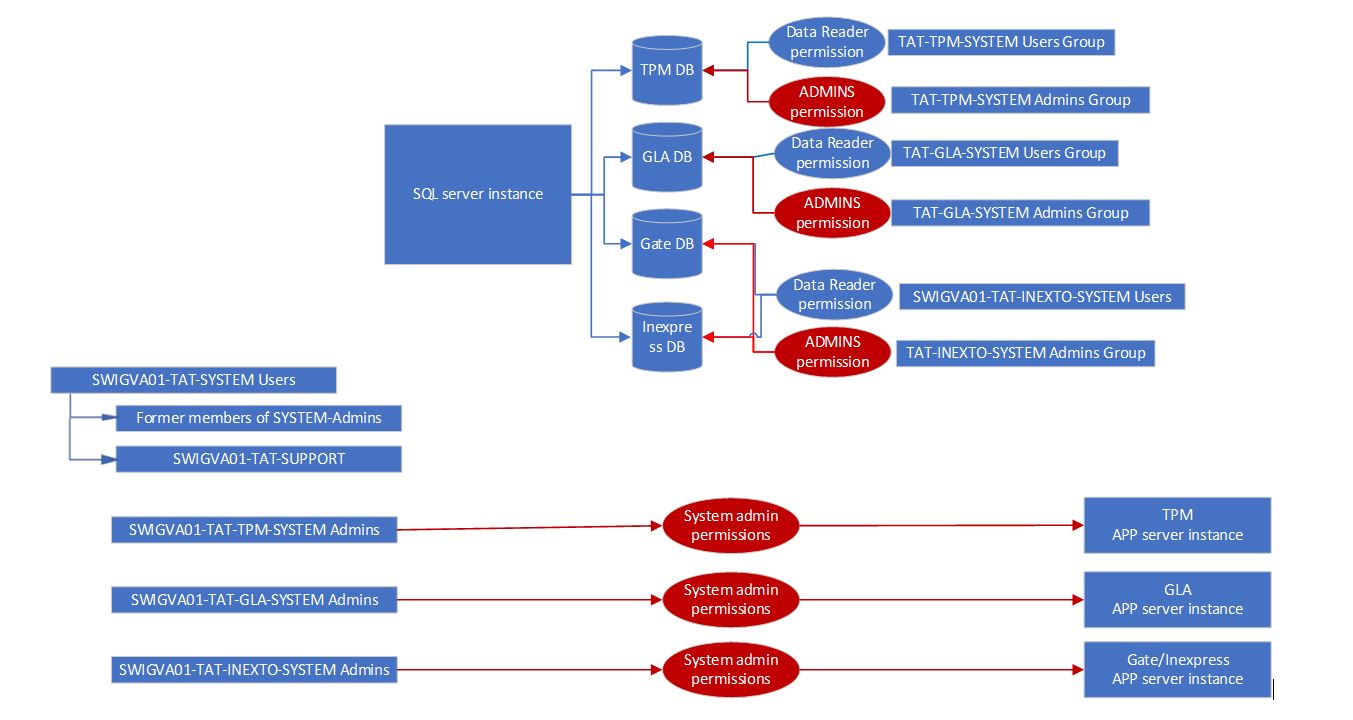
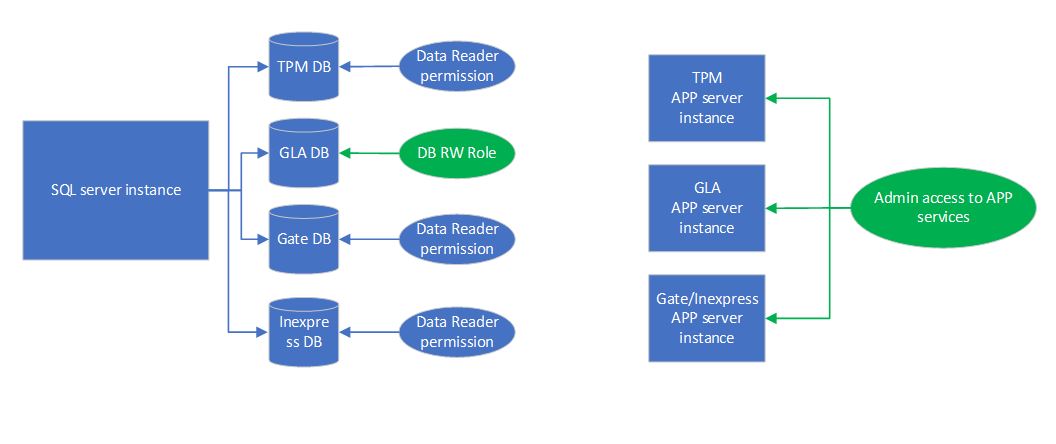
5.4 Permission Model
The security permissions model is represented by the following schemas.
Administrators and Users permissions:
Support Team permissions [SWIGVA01-TAT-SUPPORT]:
6 T&T Service Accounts
The T&T system relies on several service accounts used by the system applications to run and to access various resources like databases, shared folders, APIs, etc. The credentials for all these service accounts must be stored in a centralized place accessible to the entire T&T team and are not reliant on any single one person.
6.1 Credentials Storage
The usernames and passwords for all service accounts used by the T&T system must be stored into the BTS_QT safe of JTI Enterprise Password Vault.
6.2 Password Change
When changing the password for any service account used by the T&T system, the new password must be maintained in BTS_QT safe of JTI Enterprise Password Vault.
7 T&T Certificates
The T&T system accesses several services which require an SSL certificate to authenticate. These certificates must be stored in a centralized place accessible to the entire T&T team and are not reliant on any single one person. Certificates expire regularly therefore a monitoring and renewal procedure must be in place to ensure that the certificates are refreshed in due time and are replaced before losing connectivity.
7.1 Certificates Storage
All the certificates used by the T&T System must be stored in ATOS_CR safe of JTI Enterprise Password Vault.
7.2 Certificates Expiration
Before any certificate expires a new one must be requested and reconfigured on the required application to ensure that connectivity is not lost due to the certificate expiration. It is noteworthy that different systems supplied by different vendors will require different lead times for the certificate refresh, this must be factored in so the refresh procedure is initiated in due time to get the new certificate before the expiration of the existing one.
7.3 Certificate Expiration Monitoring
It is the responsibility of JTI to monitor the expiration date of all the certificates and request certificate replacement. In order to do that JTI must ensure that a certificate monitoring system and the process are in place which will alert when the certificates are about to expire.
8 Access to T&T Resources
SQL databases It is recommended that all supported teams should use MS SQL Server Management tool on their own machines, through VDI or oneportal.jti.com whenever possible.
Windows System Services Standard Windows Service Console on own machines
Remote Desktop RDP usage should be treated as an exception to avoid server resource utilization and the standard license allows only for 2 simultaneously remote session
9 Access to the SAP System and Corresponding T&T Functionality
Access to the SAP system and corresponding T&T functionality is realized in line with SAP Security Standard (10.118) and SAP Account and Access Management Procedure (10.071). In the context of T&T, the following access types are used and realized via JTI SAP Security model:
9.1 Business Users
Business users are getting access to SAP T&T functionality via their standard business SAP Security roles, enhanced to include T&T transactions and authorization objects, and assigned to their SAP accounts (SAP User Groups = USER or GENERIC). Business role granting is executed via standard SAP GRC functionality.
9.2 IT BTS TT Experts
Under normal circumstances, IT BTS TT users are getting access to SAP T&T functionality via their standard business SAP Security roles, enhanced to include T&T transactions and authorization objects, and assigned to their SAP accounts (SAP User Groups = USER or GENERIC).
In case of urgent problems, Emergency Access Management (EAM) accounts are used, to execute firefighting tasks outside IT BTS TT normal job function and ensures that IT BTS TT Experts are operating within a controlled and fully auditable environment.
EAM Roles granting and control are executed via standard SAP GRC EAM functionality; EAM access ownership is granted to IT BTS TT Director and IT GDC TTDC Director.
9.3 System Users
Integration with other T&T systems within the JTI systems landscape (e.g., with Factory GLA systems) is executed via dedicated system accounts (SAP User Groups = SYS).
To restrict access according to Segregation of Duties (SoD) requirements, and to identify interfacing system, for each Production T&T system, connected to SAP S/4 Production system, a separate dedicated system SAP account should be generated with permissions, limiting SAP access by system entity only.
(As an example, Production Trier factory GLA will be allowed to acquire production orders data and post production order confirmations for the Trier factory plant only and not allowed to access data for other plants.)
SAP S/4 Production system connection parameters and system account name and password are managed as confidential by appointed IT BTS TT and IT GDC TTDC experts. Connecting T&T system is fully responsible for secure storage, maintenance and proper applying of SAP connection parameters and credentials, data are not accessible to any system user or support team except appointed IT BTS TT and IT GDC TTDC experts.
10 Permissions Monitoring
The administrative user accounts are under JSOX control and are being monitored accordingly.
11 Document control
11.1 Contact person
Questions and feedback regarding this standard should be submitted to the BTS T&T Team.
11.2 Revision History
| Version | Effective Date | Reason for Changes |
|---|---|---|
| 1 | July 2021 | New document |
| 1.1 | August 2021 | Updated with Service Accounts and Certificates |
| 1.2 | April 2022 | Upload to CMS |
| 1.3 | July 2022 | Implement DCTA recommendations (CHG239138) |
| 1.4 | August 2022 | Add GSC CP support team to scope of the document |
| 1.5 | August 2023 | Update permissions for Support team |
| Version | Effective date | Purpose of change | Author |
|---|---|---|---|
| 2 | 01-Aug-2022 | The GSC CP support team has been added to the scope of the document | Andrei Dohataru |
| 1 | 01-July-2021 | First version of the document | Andrei Dohataru |
12 References
ANY QUESTIONS?