Test Automation Guideline
Version: 1, effective date: 03-Feb-2022
Contents
1 Document Description
This document describes (tbd)
2 Document Objectives and Benefits
2.1 Objectives
The objective of the document is to provide a clear guideline about Test automation for functional testing for T&T systems, environment configurations, and BDD standards.
2.2 Benefits
tbd
3 Definitions
3.1 Abbreviations and Terms
| Abbreviation / Term | Explanation |
|---|---|
| T&T | Track and Trace |
| BDD | Behavior Driven Development |
Please refer to IT Glossary in the IT P&P portal for further definitions.
4 Roles and Responsibilities
| # | Activity | GDC T&T | BTS T&T |
|---|---|---|---|
| 1 | Define and maintain Standard | A / R | C |
| 2 | Apply the Standard in the T&T Implementation projects | A / R | R |
5 Behavior Driven Development (BDD)
BDD (Behavior Driven Development) is a subset of Test-Driven Development (TDD). BDD bases software testing on human-readable descriptions of software user requirements. An early phase in BDD, similar to Domain-Driven Design (DDD), is the establishment of a shared language among stakeholders, domain experts, and developers. This procedure includes defining entities, events, and outputs that are important to users and assigning them names that everyone can agree on.
BDD practitioners then utilize that vocabulary to develop a domain-specific language for encoding system tests such as User Acceptance Tests (UAT).
Each test is built on a user story written in the officially specified ubiquitous language, which is based on English. (An understandable language that can be understood by all stakeholders.)
A test for Facility information request from API Might look like this:
A T&T system user

In order to get information about a specific facility

User needs to send specific values to API

User receives the Facility information if Facility exists

Given User wants to search Facility

When Facility ID is urn:atos:loc: JTISAP_ECC_PRD:DE14

And Request sent to API endpoint

Then User receives 200 response with Facility information returned
Attention should be given to how this language in the second part focuses solely on the commercial value that a user should receive from the program rather than detailing the product’s user interface or how the software should achieve the goals.
Writing down these user requirements early in the process saves a lot of time by preventing rework later by getting the team and consumers on the same page about the specifications of the product.
5.1 Benefits of BDD
-
Simple language - the straightforward language is usable/understandable, not only by domain experts but also by every member of the team.
-
Focus - BDD helps teams focus on a product’s behavioral elements rather than focusing on testing the technical implementation of isolation through individual units. This subtle, but important shift, means that everyone is focused on what the behavior of the product should be.
-
Using Scenarios - BDD is designed to speed up the development process. Everyone involved in development works with the same scenarios. Scenarios are requirements, acceptance criteria, test cases, and test scripts all in one; there is no need to write any other artifact.
-
Efficiency - BDD frameworks make it easy to turn scenarios into automated tests. The steps are already given by the scenarios - the automation engineer simply needs to write a method/function to perform each step’s operations.
5.2 Writing BDD Scenarios
In the simplest format, there are 3 key elements in any BDD scenario :
-
GIVEN (describing the context)
-
WHEN (describing the action)
-
THEN (describing the outcome)
These 3 elements help to describe the behavior of the system using context, actions, and outcomes. If more than one or more information is required other than this, add them with AND. This adds necessary context like below:
-
GIVEN (context)
-
AND (further context)
-
WHEN (action/event)
-
AND (further action/event)
-
THEN (outcome)
-
AND (further outcome)
5.3 Principles of BDD
-
BDD encourages simple languages to be used across teams, known as ubiquitous languages.
-
A simple and easy-to-use language should be used in the writing of the tests so that in theory, a business person can read a test and understand what it is testing.
-
Tests are often written from the customer’s point of view; the focus is on the customers and the users who are interacting with the product
6 Tools And Libraries To Be Used
6.1 Python
6.2 Behave
For BDD test automation Behave Python Libraries are compatible and easy to use, therefore test cases should be written before any work on automation test case starts. By following the above BDD principles, understandable test cases can be written even by non-technical people.
6.3 Selenium
Automation of UI test cases will be done using Selenium. This testing framework is used to validate web applications across different browsers and platforms.
6.4 Allure
Even though test reports are created in Azure’s pipeline, when it is executed locally, to see the results in a detailed well structured template. Allure has a compatible Json output formatter coming from the allure-behave python package.
Therefore all test executions can be checked afterwards.
7 Environment Setup Instructions
7.1 Python Framework
7.1.1 Installation Of Python
- To download and install Python, visit the official website of Python
- Once the download is completed, run the .exe file to install Python. Click on “Install Now”
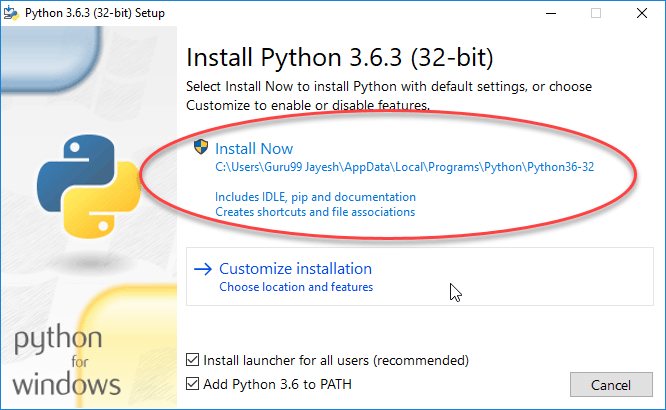
- Make sure that python is added to environment variables
7.1.2 Installation of Pycharm
- Download Pycharm from official website
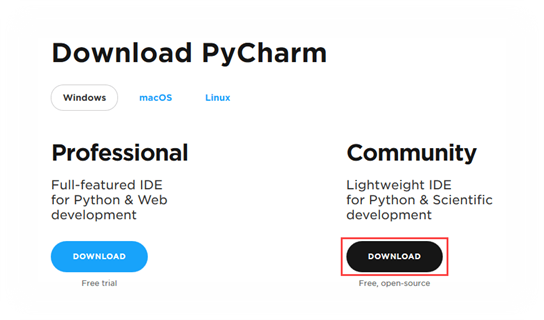
- Run the pycharm_2021.3.1.exe file that starts the Installation Wizard
- Follow all steps suggested by the wizard. Please pay special attention to the corresponding installation options
7.1.3 Clone GIT Repo
- Open Pycharm and from the landing page and click on “Check from Version Control” select “Github”
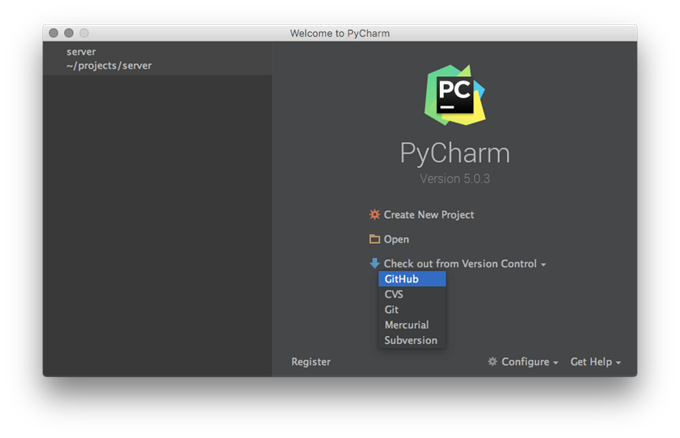
- Enter the credentials given for GIT Repo and clone the project into the environment
7.1.4 Installation of Dependent Packages
From here in the terminal execute the below codes
-
pip install –Upgrade pip
-
pip install requests
-
pip install python-dateutil
-
pip install behave
-
pip install allure-behave
-
pip install selenium
8 Creation of Test Case Scenarios
8.1 Feature Files
Behave operates on directories containing:
- Feature files written by Business Analyst / Sponsor / whoever with behavior scenarios in it
- A “steps” directory with Python step implementations for the scenarios
May optionally include some environmental controls (code to run before and after steps, scenarios, features, or the whole shooting match).
The minimum requirement for a features directory is:
features/
features/everything.feature
features/steps/
features/steps/steps.py
8.1.1 Gerkhin Language Structure
A feature file has a natural language format describing a feature or part of a feature with representative examples of expected outcomes. They are plain-text (encoded in UTF-8) and look something like:
Feature: Get Content Tests
     @CaseId:8494
     Scenario: user wants to retrieve information for the bundle from API Get Content
      Given user wants to search any content in the QA environment
      When content is 017625191248011121NBL7J1RS8GWY
      And request sent to GetContent API endpoint of QA environment
      Then user receives 200 response with Content information returned
The “Given,” “When” and “Then” parts of this prose, forms the actual steps that are going to be taken by Behave in the testing system. These map to Python step implementations. As a general guide:
Given puts the system in a known state before the user (or external system) starts interacting with the system (in the When steps). Avoid talking about user interaction in Given’s.
When taking key actions the user (or external system) performs. This is the interaction with the system which should (or should not) cause some state to change.
Then observe outcomes.
8.1.2 Scenario Outlines
Sometimes a scenario should be run with several variables giving a set of known states, actions to take and expected outcomes, all using the same basic actions. May use a Scenario Outline to achieve this:
Scenario Outline: Functions
     Given I put  in a function,
     when I trigger the function()
     then it should transform into
    Examples: Amphibians
     |thing|other thing|
     |Frog|Fish|
    Examples: Consumer Electronics
     |thing|other thing|
     |Camera|Web Cam|
     |Chip|Computer|
Behave will run the scenario once for each (non-heading) line appearing in the example data tables.
8.1.3 Step Data
Sometimes it is useful to associate a table of data with a step.
Any text block following a step wrapped in ["""] lines will be associated with the step. For example:
Scenario: some scenario
     Given a sample text loaded into the frobulator
     """
     Lorem ipsum dolor sit amet, consectetur adipisicing elit, sed do
     eiusmod tempor incididunt ut labore et dolore magna aliqua.
     """
    When activate the frobulator
    Then will find it similar to English
The text is available to the Python step code as the “.text” attribute in the Context variable passed into each step function.
This may also associate a table of data with a step by simply entering it, indented, following the step. This can be useful for loading specific required data into a model.
Scenario: some scenario
     Given a set of specific users
     |name|department|
     |Barry|Beer Cans|
     |Pudey|Silly Walks|
     |Two-Lumps|Silly Walks|

    When count the number of people in each department
    Then will find two people in "Silly Walks"
     But will find one person in "Beer Cans"
The table is available to the Python step code as the “.table” attribute in the Context variable passed into each step function. The table for the example above could be accessed like so:
@given('a set of specific users')
    def step_impl(context):
     for row in context.table:
      model.add_user(name=row['name'], department=row['department'])
There are various ways to access the table data - see the Table API documentation for the full details.
8.2 Python Step Implementations
Steps used in the scenarios are implemented in Python files in the “steps” directory they should always end with file extension [*.py].
Steps are identified using decorators which match the predicate from the feature file given, when, then and step (variants with Title case are also available if that is the preference.) The decorator accepts a string containing the rest of the phrase used in the scenario step it belongs to.
Given a Scenario:
Scenario: Search for an account
     Given I search for a valid account
      Then I will see the account details
Step code implementing the two steps here might look like (using selenium webdriver and some other helpers):
@given('I search for a valid account')
    def step_impl(context):
     context.browser.get('http://localhost:8000/index')
     form = get_element(context.browser, tag='form')
     get_element(form, name="msisdn").send_keys('61415551234')
     form.submit()

    @then('I will see the account details')
    def step_impl(context):
     elements = find_elements(context.browser,  id='no-account')
     eq_(elements, [], 'account not found')
     h = get_element(context.browser,  id='account-head')
     ok_(h.text.startswith("Account 61415551234"),
      'Heading *%r* has wrong text'  % h.text)
The [step] decorator matches the step to any step type, “given,” “when” or “then.” The “and” and “but” step types are renamed internally to take the preceding step’s keyword (so an “and” following a “given” will become a “given” internally and use a given decorated step).
8.2.1 Step Parameters
Feature steps sometimes include common phrases with only some variation. For example:
Scenario: look up a book
     Given I search for a valid book
      Then the result page will include "success"

    Scenario: lookup an invalid book
     Given I search for an invalid book
      Then the result page will include "failure"
You may define a single Python step that handles both of those Then clauses (with a Given step that puts some text into [context response]):
@then('the result page will include "*{text}*"')
    def step_impl(context, text):
     if text **not**  **in** context.response:
      fail('*%r* not in *%r*' % (text, context.response))
Note: The full detail of the Python side of behave is in the API documentation.
9 Helper Files
Helpers, as the name suggests, help you with tasks. Each helper file is simply a collection of functions in a particular category. There are URL Helpers, that assist in creating links, there are Form Helpers that help you create form elements, Text Helpers perform various text formatting routines, Cookie Helpers set and read cookies, File Helpers help you deal with files, etc.
9.1 Using A Helper
Once the Helper File containing the function is intended to be used, it should be called the same way as it performs as a standard function.
For example, to perform a Get Content API request using the function() in one of the helper files would look like this:
def get_content_info(content_id: str, access_token: str):
        url = f'{API_URL}/v1/cm/corporate/tools/lookup/children/{content_id}'
        header = __get_request_header(access_token)
        response = requests.request('GET', url, headers=header)
        if response.status_code == 401:
            raise AuthenticationError
        elif response.status_code == 403:
            raise AuthenticationError('Operation forbidden!')
        elif response.status_code == 404:
            return None
        elif (response.status_code >= 200) and (response.status_code < 300):
            return response.text
        else:
            raise Exception('Unknown error')
Where “Click Here” is the name of the link, and blog/comment is the URI to the controller/method you wish to link to.
10 Reporting
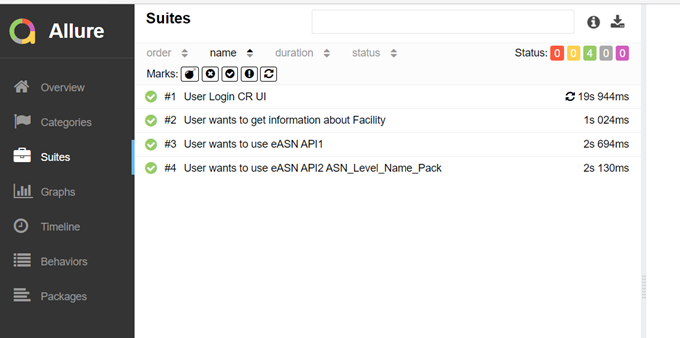
Allure Framework is a flexible lightweight multi-language test report tool that not only shows a very concise representation of what was tested in a neat web report form, also allows everyone participating in the development process to extract the maximum amount of useful information from day to day execution of tests.
10.1 Behave Test With Allure Report
Run code below from the terminal:
C:\> behave -f allure_behave.formatter:AllureFormatter -o {allure_report_folder} {path_to_feature_file}
After this, json files will be generated in the given allure_report_folder
To combine json file html report, with allure command:
C:\> allure serve {allure_report_folder}
Then, a live server will be started at http://127.0.1.1:45973
11 Document Control
| Version | Effective date | Purpose of change | Author |
|---|---|---|---|
| 1 | 03-Feb-2022 | First version of the document | Olga Ovchinnikova |
11.1 Document Owner
Berhan Cem Özelbiçer
11.2 Contact Person
Questions and feedback regarding this standard should be submitted to Olga Ovchinnikova.
11.3 Revision History
| Version | Effective date | Purpose of change | Author |
|---|---|---|---|
| 1 | 03-Feb-2022 | First version of the document | Olga Ovchinnikova |
12 References
ANY QUESTIONS?