Test Automation Standard
Version: 3, effective date: 22-Feb-2022
Contents
1 Standard Description
This document defines information on running tests automatically, managing test data, and utilizing results to improve software quality.
2 Document Objectives and Benefits
2.1 Objectives
Objectives of the document are:
- Identify the main processes that involve test automation and its components
- Set standards needed for test automation.
2.2 Benefits
The document helps to describe test automation processes. While doing so will benefit with below:
-
Improved production reliability
-
Increased production speed and quality
-
Prevention of emergency situations
-
Improved production control
3 Definitions
| Abbreviation / Term | Explanation |
|---|---|
| QA | Quality Assurance |
| SDLC | Sofware Development Life Cycle |
| API | Application Programming Interface |
| UI | User Interface |
| ROI | Return On Investment |
| QTP | Quick Test Professional (A HP Software testing tool) |
| AUT | Application Under Test |
Please refer to IT Glossary in the IT P&P portal for further definitions.
4 Roles and Responsibilities
| # | Activity | GDC T&T | BTS T&T | GSC CP |
|---|---|---|---|---|
| 1 | Define and maintain Standard | A/R | C | I |
| 2 | Apply the Standard in the T&T Implementation projects | A/R | C | I |
5 Introduction to Test Automation
5.1 Goals
Automated testing is an essential part of the quality control process. Unlike manual testing, it uses special software for the implementation of test processes and assisting in test management, design, execution, etc. To run automated tests, QA engineers apply a ready-to-use tool or solutions that require writing additional code.
Automation helps to speed up the process, covering more test areas in less time. As a result, QA engineers get more time to handle high-level tasks that require human input. This highlight defines the key automated testing goals.
- Quality and user satisfaction always go hand-in-hand, defining the main goal of software testing. All members of a QA team use different types of testing and tools to achieve the same goal: to release software without critical bugs and make sure users are happy with it. Automation testing contributes to it with its special techniques.
- Automation is applied where manual testing would have taken a lot of time. It helps to shorten test time and simplify testing of complex applications with many features. QA engineers can set up the system, and it can start running automatically at night, for instance. Every test scenario can be executed multiple times, making automation useful for regression. Therefore, automation optimizes the time and human resources.
5.2 Objectives
The objectives are specific actions that help to achieve bigger automation testing goals.
- Enhancing Software Quality After Each Iteration
QA specialists apply automation to check software specifications after each iteration. Along with bug detection, they focus on bug prevention and localization. To achieve this, it is necessary to cover all possible scenarios of software behavior. Well-written automation tests can work as “bug-repellents” and prevent mistakes that are expensive to fix.
- Improving Stability and Reliability
Modeling stress situations and seemingly impossible scenarios (peak traffic, an enormous number of users requesting the same feature, etc.) helps to discover how an app behaves in unusual circumstances. Modeling, in turn, allows preventing crashes and lags if such situations occur. To avoid introducing new risks, any test-specific code is plugged in by the test and only in a test environment.
- Creating Tests That Are Easy to Run
The tests should be fully automated, so it is possible to run them effortlessly. Tests should also be self-checking (detect and report errors without manual inspection) and repeatable (suitable for multiple uses). Ideally, QA engineers should be able to run each test independently.
- Creating Tests That Are Easy to Maintain
When QA professionals write automated tests, they still need to focus on testing, not on the code for automation. Therefore, tests should be easy to write, read, understand, and modify in the future. They should require minimal maintenance as the system evolves.
- Expanding Test Coverage
QA engineers aim to cover the widest test area possible. To check all user scenarios, they need to execute hundreds of test cases, validate boundary and edge cases, ensure compatibility with different devices and browsers. Automation can cover both API and UI testing.
5.3 Standards to Follow
The key is to build an effective test automation strategy to eliminate the errors that can be expected in manual testing. A Test Automation framework enables teams to cut down the costs and efforts in the testing process. Most importantly, it makes the process repeatable, which helps confirm the functionalities of the application.
It also adds the reusability factor, where the test automation framework, when updated with new test cases can be reused for any other testing project.
5.3.1 Result-oriented test automation strategy
When strategy gets driven by objectives, it’s necessary to set up parameters to measure its success. The objectives could be different – faster time to market, rigorous regression testing, reduced testing efforts, enhanced test coverage, cost-effective testing, etc. It is important to understand and define objectives for test automation strategy. This will help to make the overall process and related activities result-oriented.
5.3.2 Work with a suitable test automation tool
Multiple tools exist in the market – some are commercial tools, while some are popular Open-source free tools. Choice of the tool will depend on testing objectives and requirements as well as the budgets. But making the choice is critical.
There are a few key parameters to consider while shortlisting and freezing on a tool, namely, maintenance costs, training costs, renewal costs, support from the team, compatibility of the tool across platforms, and consistent performance of the tool across diverse projects.
5.3.3 Prioritized test cases to be automated
Automating the right test case is crucial to have effective test automation. As for start categorize the test cases by their importance, usually, the best practice is to automate integration test cases first then move with smoke and regression test cases. Not every test case is necessary to be automated, just the ones that are repeating and business-related.
5.3.4 Create reusable scripts
Reusability of test scripts is one of the key reasons for considering test automation. The idea is to build scripts and automation frameworks that can be implemented across functions. It is important that consider this aspect in test automation strategy.
5.3.5 Blend test automation strategy within the plan
Test automation strategy can be successful only when it blends effectively with the overall development plan. The best approach is to build a strategy that essentially aligns with overall development and business goals. For instance, the goal is to build an application that is secure and collaborates with the entire vendor/third-party ecosystem.
So, depending on this objective prioritize and structure test automation strategy. The objective will be to make the application/system secure and integrate effectively with third-party systems/vendor interfaces.
5.4 When to Use Automation
Test automation goals and objectives are centered around facilitating the test process and boosting its efficiency. The larger the project is, the more relevant it is to use automated testing. Usually, the most strategically important areas are subject to automation. Remember that automated testing is not a substitute for manual testing – it is rather a powerful backup. It’s best to apply manual and automated testing in the proportions that work best for the project.
Usually, if the product is being developed from scratch, automation doesn’t have a big importance. Since the product is open to constant changes and new test cases/stories can be created or modified it’s recommended to wait until the product reaches a level of maturity.
It is best to start automating test cases when there are more static test suites created for integration, smoke, and regression tests.
Also, below its listed for any projects to automate tests:
-
When repetitive tests are being used
If there is a need to run the same test again and again without changing it, the likelihood is it would be much more time-efficient to automate.
That’s because a manual task being repeated regularly wastes the team’s valuable time and is likely to lead to more errors due to lack of attention.
-
When the time will be saved
Every engineering and QA team needs more time. Especially when contending with lightning-quick SDLCs, any time-saving activity can have a huge impact on a team’s productivity.
-
When tests are run frequently
Having the capacity to run frequent tests at high volume just isn’t a possibility in many engineering teams. Manual testing can only go so far, especially for smaller teams with no in-house testing team.
-
When there is a need to run multiple tests at once
Running the same manual tests simultaneously is effort-consuming. The likelihood of a team having the capacity to run 100 tests at the same time is low. Automation makes this task super-fast and enables teams to test rapidly without feeling the pressure.
5.5 Levels of Test Automation
Aside from the types of automation testing, Smoke Tests, Integration Tests, Regression Tests, Security Tests, Performance Tests, Acceptance Tests, etc. are also common in the field of test automation.
5.5.1 Integration Tests
Integration tests take all the individual pieces and functionalities of a software solution and test them together as a whole to guarantee smooth operation between all of them.
5.5.2 Smoke Tests
Smoke tests are a type of Functional test that only covers the most crucial features of a software solution to ensure that it could be further tested without “catching fire,” hence the name Smoke Tests.
5.5.3 Regression Tests
Regression tests run a combination of Functional tests to check if the software has “regressed” after a given change.
5.5.4 Security Tests
Security tests cover Functional and Non-functional tests that screen the software for any vulnerabilities. They reveal weaknesses and any potential exploit in a system.
5.5.5 Performance Tests
Performance tests are often Non-functional tests that help testers evaluate criteria like responsiveness and stability as the software handles load and stress.
5.6 Phases of Test Automation
5.6.1 Unit
As the name implies, this phase tests the individual components, or units, of software. Unit testing is the very first phase of testing, usually done manually by developers before handing the software off to testers, but it could also be automated.
5.6.2 API
Application Programming Interface (or API for short) acts as the “middleman” between all the systems that software uses, and thus, is then tested after the development process to ensure smooth integration between systems and software. Some of the API tests can be run directly during the integration and smoke tests to decide build approval.
5.6.3 UI
User Interface (UI) is what the end-users see and interact with and, thus, is usually tested at the very end of the process. This phase of testing is run by testers where most of the use cases and test cases are built upon. This is where the business logic of the software is examined and optimized, which also falls under the Functional test classification and automation efforts will be spent here mostly.
5.7 Test Automation Frameworks
5.7.1 Linear Framework (Record and Playback)
This is the most basic kind of framework. Testers write and run a test script for each individual test case, like recording and playing back a clip on a screen, hence the name “record and playback.” Because of its simplicity, it is most suited for small teams and test automation beginners.
5.7.2 Modular Based Framework
This framework organizes each test case into smaller parts called modules, and these modules are independent of each other. Modules of any given scenario are then handled uniformly by a “master script,” saving testers a lot of time and optimizing their workflow. However, prior planning and test automation knowledge are required to successfully implement this framework.
5.7.3 Library Architecture Framework
Building on top of the Modular Framework, the Library Architecture Framework boasts several advantages over the former. Instead of breaking up the test case, this framework groups similar tasks within the test script into functions and then stores them in a library. Since these functions consist of tasks with common objectives, they can be called upon by the test script whenever a functionality is needed. This kind of structure allows for even greater reusability and flexibility in testing but at the cost of more time writing the script and test automation experience required.
5.8 Testing Tool Evaluation
5.8.1 Does the team possess the necessary skills to best utilize the tool?
Automation testing is much more technical than manual testing. In many automation tools, especially open-source software, testers must possess a sufficient level of programming knowledge to write and execute test scripts. This technical barrier appears to be the most challenging obstacle in adopting test automation for QA teams with limited IT background.
5.8.2 What is the team budget?
Test automation is not affordable in many cases. However, it brings out a positive ROI for the team and business in the long run as long as the budget is calculated thoroughly. Depending on the budget, it will be easier to pick the appropriate software, an open-source or commercial tool.
5.8.3 What features to look for?
While the requirements vary from team to team, there are some key factors that should always be taken into consideration when choosing a suitable automation tool. They include:
-
Supported platforms
-
An applied application under tests
-
Programming languages
-
CI/CD integration capabilities
-
Reporting functionality
5.8.4 How and where to get technical support?
Another key point to be noticed is the support for the tool. For commercial tools, they should provide users with prompt customer support for all technical issues. Remember to check out their official documentation and website to see what means of the support team can get. In terms of open-source software, a large and active user community is whenever encountering problems.
6 Test Automation Process Flow
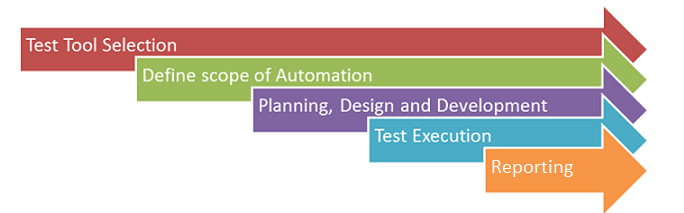
6.1 Test Tool Selection
Test Tool selection largely depends on the technology the Application Under Test (AUT) is built on. For instance, QTP does not support Informatica. So that Selenium cannot be used for testing desktop applications. It’s a good idea to conduct a Proof of Concept of Tool on AUT.
6.2 Define the Scope of Automation
The scope of automation is the area of Application Under Test which will be automated. The following points help determine scope:
-
The features that are important for the business
-
Scenarios that have a large amount of data
-
Common functionalities across applications
-
Technical feasibility
-
The extent to which business components are reused
-
The complexity of test cases
-
Ability to use the same test cases for cross-browser testing
6.3 Plan, Design, and Develop
During this phase, create an Automation strategy & plan, which contains the following details
-
Automation tools selected
-
Framework design and its features
-
In-Scope and Out-of-scope items of automation
-
Automation testbed preparation
-
Schedule and Timeline of scripting and execution
-
Deliverables of Automation Testing
6.4 Test Execution
Automation Scripts are executed during this phase. The scripts need input test data before there are set to run. Once executed they provide detailed test reports.
Execution can be performed using the automation tool directly or through the Test Management tool which will invoke the automation tool.
6.5 Reporting
Test automation reporting is a crucial component in an automation framework. When automated test suites are executed, the results will be the only artifacts for which the team could analyze their failures. They also guide through whether or not to release a product.
Reporting formats are different in each tool; however, some metrics are must-haves regardless of format:
-
Total Number of scripts
-
List of all test cases in tabular form
-
Test Result (Passed/Failed status of every test case)
-
Duration
-
Machine/Environment Name
Depending on the automation test results and reports Test Manager and Project Managers should carry out decision makings about the tested release.
7 Document control
7.1 Standard Owner
Olga Ovchinnikova
7.2 Contact person
Questions and feedback regarding this standard should be submitted to Berhan Cem Özelbiçer
7.3 SIGN OFF
| Name | Title | Function | Signoff Date |
|---|---|---|---|
| Avni Cengel | GDC T&T Delivery Center Director | IT T&T Delivery Center | |
| Sergey Khitrin | BTS T&T Service Director | IT BTS T&T | 22.09.2021 |
7.4 Revision History
| Version | Effective date | Purpose of change | Author |
|---|---|---|---|
| 3 | 22-Feb-2022 | Grammar and Structure check | Olga Ovchinnikova |
| 2 | 20-Sep-2021 | GDC TTDC and BTS TT Review | Olga Ovchinnikova |
| 1 | 08-Sep-2021 | Draft Version Created | Olga Ovchinnikova |
8 References
ANY QUESTIONS?