Testing Checklist
Version: 1, effective date: 01-Oct-2021
Contents
- 1 Important Notes
- 2 Testing Checklist
- 2.1 Software Testing Hierarchy
- 2.2 Different Types of Testing
- 2.3 Unit Testing
- 2.4 Integration Testing
- 2.5 Smoke Testing
- 2.6 Sanity Testing
- 2.7 Sanity Testing and Smoke Testing difference
- 2.8 Regression Testing
- 2.9 System Testing
- 2.10 Alpha Testing and Beta Testing
- 2.11 Performance Testing
- 2.12 Security Testing
- 3 Document control
1 Important Notes
This Document is written for the aim of explaining most common testing types which are suitable to use in JTI applications and testing standards yet there are more than 100 testing types that can be applied in software projects.Even if the testing type didn’t included in this Appendix there may be future needs to include them.
Software Testing Type is a classification of different testing activities into categories, each having, a defined test objective, test strategy, and test deliverables. The goal of having a testing type is to validate the Application Under Test(AUT) for the defined Test Objective.
2 Testing Checklist
2.1 Software Testing Hierarchy
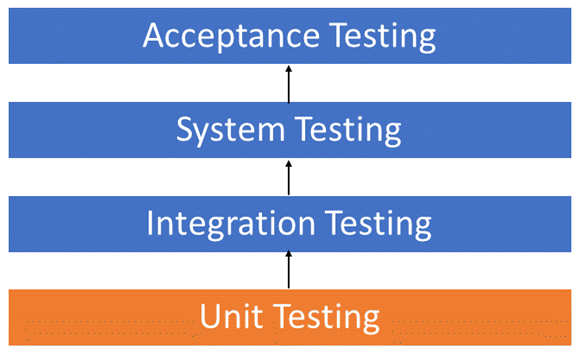
While testing the applications, one should consider the below mentioned template.
As with almost any software engineering process, software testing has a prescribed order in which things should be done. The following is a list of software testing categories arranged in chronological order. These are the steps taken to fully test new software in preparation for marketing it:
-
Unit testing - performed on each module or block of code during development. Unit Testing is normally done by the programmer who writes the code.
-
Integration testing - done before, during and after integration of a new module into the main software package. This involves testing of each individual code module. One piece of software can contain several modules which are often created by several different programmers. It is crucial to test each module’s effect on the entire program model.
-
System testing - done by a professional testing agent on the completed software product before it is introduced to the market.
-
Acceptance testing - beta testing of the product done by the actual end users.
2.2 Different Types of Testing
2.3 Unit Testing
Unit Testing is a type of software testing where individual units or components of a software are tested. The purpose is to validate that each unit of the software code performs as expected. Unit Testing is done during the development (coding phase) of an application by the developers. Unit Tests isolate a section of code and verify its correctness. A unit may be an individual function, method, procedure, module, or object.
In SDLC, STLC, V Model, Unit testing is first level of testing done before integration testing. Unit testing is a WhiteBox testing technique that is usually performed by the developer. Though, in a practical world due to time crunch or reluctance of developers to tests, QA engineers also do unit testing.
2.3.1 Why Unit Testing?
Unit Testing is important because software developers sometimes try saving time doing minimal unit testing and this is myth because inappropriate unit testing leads to high cost Defect fixing during System Testing, Integration Testing and even Beta Testing after application is built. If proper unit testing is done in early development, then it saves time and money in the end.
Here, are the key reasons to perform unit testing in software engineering:
-
Unit tests help to fix bugs early in the development cycle and save costs.
-
It helps the developers to understand the testing code base and enables them to make changes quickly
-
Good unit tests serve as project documentation
-
Unit tests help with code re-use. Migrate both the code and tests of the new project. Tweak the code until the tests run again.
2.3.2 How to do Unit Testing
To do Unit Testing, developers write a section of code to test a specific function in software application. Developers can also isolate this function to test more rigorously which reveals unnecessary dependencies between function being tested and other units so the dependencies can be eliminated. Developers generally use Unit Test framework to develop automated test cases for unit testing.
Unit testing is commonly automated but may still be performed manually. Software Engineering does not favor one over the other, but automation is preferred. A manual approach to unit testing may employ a step-by-step instructional document.
Under the automated approach
A developer writes a section of code in the application just to test the function. They would later comment out and finally remove the test code when the application is deployed.
A developer could also isolate the function to test it more rigorously. This is a more thorough unit testing practice that involves copy and paste of code to its own testing environment than its natural environment. Isolating the code helps in revealing unnecessary dependencies between the code being tested and other units or data spaces in the product. These dependencies can then be eliminated.
A coder generally uses a Unit Test Framework to develop automated test cases. Using an automation framework, the developer codes criteria into the test to verify the correctness of the code. During execution of the test cases, the framework logs failing test cases. Many frameworks will also automatically flag and report, in summary, these failed test cases. Depending on the severity of a failure, the framework may halt subsequent testing.
The workflow of Unit Testing is
-
Create Test Cases
-
Review/Rework
-
Baseline
-
Execute Test Cases.
2.3.3 Test Driven Development (TDD) & Unit Testing
Unit testing in TDD involves an extensive use of testing frameworks. A unit test framework is used to create automated unit tests. Unit testing frameworks are not unique to TDD, but they are essential to it. Below we look at some of what TDD brings to the world of unit testing:
-
Tests are written before the code
-
Rely heavily on testing frameworks
-
All classes in the applications are tested
-
Quick and easy integration is made possible
2.3.4 Unit Testing Best Practices
-
Unit Test cases should be independent. In case of any enhancements or change in requirements, unit test cases should not be affected.
-
Test only one code at a time.
-
Follow clear and consistent naming conventions for unit tests
-
In case of a change in code in any module, ensure there is a corresponding unit Test Case for the module, and the module passes the tests before changing the implementation
-
Bugs identified during unit testing must be fixed before proceeding to the next phase in SDLC
-
Adopt a “test as you code” approach. The more code written without testing; the more paths must be checked for errors.
2.4 Integration Testing
Integration Testing is defined as a type of testing where software modules are integrated logically and tested as a group. A typical software project consists of multiple software modules, coded by different programmers. The purpose of this level of testing is to expose defects in the interaction between these software modules when they are integrated
2.4.1 Why Integration Testing?
Integration Testing focuses on checking data communication amongst these modules. Hence it is also termed as ‘I & T’ (Integration and Testing), ‘String Testing’ and sometimes ‘Thread Testing’.
Although each software module is unit tested, defects still exist for various reasons like
-
A Module, in general, is designed by an individual software developer whose understanding and programming logic may differ from other programmers. Integration Testing becomes necessary to verify the software modules work in unity
-
At the time of module development, there are wide chances of change in requirements by the clients. These new requirements may not be unit tested and hence system integration Testing becomes necessary.
-
Interfaces of the software modules with the database could be erroneous
-
External Hardware interfaces, if any, could be erroneous
-
Inadequate exception handling could cause issues.
Integration Test Case differs from other test cases in the sense it focuses mainly on the interfaces & flow of data/information between the modules. Here priority is to be given for the integrating links rather than the unit functions which are already tested.
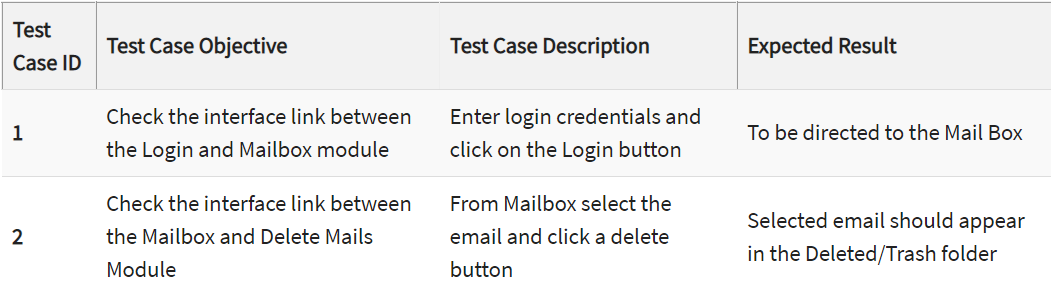
Sample Integration Test Cases for the following scenario: Application has 3 modules say, ‘Login Page’, ‘Mailbox’ and ‘Delete emails’ and each of them is integrated logically.
Here do not concentrate much on the Login Page testing as it’s already been done in Unit Testing. But check how it’s linked to the Mailbox Page.
Similarly, Mailbox: Check its integration to the Delete Mails Module.
2.4.2 How to do Integration Testing?
The Integration test procedure irrespective of the Software testing strategies (discussed above):
-
Prepare the Integration Tests Plan
-
Design the Test Scenarios, Cases, and Scripts.
-
Executing the test Cases followed by reporting the defects.
-
Tracking & re-testing the defects.
-
Steps 3 and 4 are repeated until the completion of Integration is successful.
2.4.3 Approaches, Strategies, Methodologies of Integration Testing
Software Engineering defines variety of strategies to execute Integration testing, viz.
-
Big Bang Approach
-
Incremental Approach, which is further divided into the following
- Top Down Approach
- Bottom Up Approach
-
“Sandwich” Approach - Combination of Top Down and Bottom Up
Below are the different strategies, the way they are executed and their limitations as well advantages.
2.4.3.1 Big Bang Testing
Big Bang Testing is an Integration testing approach in which all the components or modules are integrated together at once and then tested as a unit. This combined set of components is considered as an entity while testing. If all the components in the unit are not completed, the integration process will not execute.
Advantages:
- Convenient for small systems.
Disadvantages:
-
Fault Localization is difficult.
-
Given the sheer number of interfaces that need to be tested in this approach, some interfaces link to be tested could be missed easily.
-
Since the Integration testing can commence only after “all” the modules are designed, the testing team will have less time for execution in the testing phase.
-
Since all modules are tested at once, high-risk critical modules are not isolated and tested on priority. Peripheral modules which deal with user interfaces are also not isolated and tested on priority.
2.4.3.2 Incremental Testing
In the Incremental Testing approach, testing is done by integrating two or more modules that are logically related to each other and then tested for proper functioning of the application. Then the other related modules are integrated incrementally, and the process continues until all the logically related modules are integrated and tested successfully.
Incremental Approach, in turn, is carried out by two different Methods:
-
Bottom Up
-
Top Down
-
Stubs and Drivers
Stubs and Drivers are the dummy programs in Integration testing used to facilitate the software testing activity. These programs act as a substitute for the missing models in the testing. They do not implement the entire programming logic of the software module, but they simulate data communication with the calling module while testing.
- Stub: Is called by the Module under Test.
- Driver: Calls the Module to be tested.
2.4.3.2.1 Bottom-up Integration Testing
Bottom-up Integration Testing is a strategy in which the lower level modules are tested first. These tested modules are then further used to facilitate the testing of higher-level modules. The process continues until all modules at top level are tested. Once the lower level modules are tested and integrated, then the next level of modules are formed.
Advantages:
- Fault localization is easier.
- No time is wasted waiting for all modules to be developed unlike Big-bang approach
Disadvantages:
- Critical modules (at the top level of software architecture) which control the flow of application are tested last and may be prone to defects.
- An early prototype is not possible
2.4.3.2.2 Top-down Integration Testing
Top Down Integration Testing is a method in which integration testing takes place from top to bottom following the control flow of software system. The higher-level modules are tested first, and then lower level modules are tested and integrated to check the software functionality. Stubs are used for testing if some modules are not ready.
Advantages:
-
Fault Localization is easier.
-
Possibility to obtain an early prototype.
-
Critical Modules are tested on priority; major design flaws could be found and fixed first.
Disadvantages:
- Needs many Stubs.
- Modules at a lower level are tested inadequately.
2.4.3.3 Sandwich Testing
Sandwich Testing is a strategy in which top level modules are tested with lower level modules at the same time lower modules are integrated with top modules and tested as a system. It is a combination of Top-down and Bottom-up approaches therefore it is called Hybrid Integration Testing. It makes use of both stubs as well as drivers.
2.4.4 Best Practices/ Guidelines for Integration Testing
-
First, determine the Integration Test Strategy that could be adopted and later prepare the test cases and test data accordingly.
-
Study the Architecture design of the Application and identify the Critical Modules. These need to be tested on priority.
-
Obtain the interface designs from the Architectural team and create test cases to verify all the interfaces in detail. Interface to database/external hardware/software application must be tested in detail.
-
After the test cases, it’s the test data which plays the critical role.
-
Always have the mock data prepared, prior to executing. Do not select test data while executing the test cases.
2.5 Smoke Testing
Smoke Testing is a software testing process that determines whether the deployed software build is stable or not. Smoke testing is a confirmation for QA team to proceed with further software testing. It consists of a minimal set of tests run on each build to test software functionalities. Smoke testing is also known as “Build Verification Testing” or “Confidence Testing.”
In simple terms, we are verifying whether the important features are working and there are no showstoppers in the build that is under testing.
It is a mini and rapid regression test of major functionality. It is a simple test that shows the product is ready for testing. This helps determine if the build is flawed as to make any further testing a waste of time and resources.
-
Easy to perform testing
-
Defects will be identified in early stages.
-
Improves the quality of the system
-
Reduces the risk
-
Progress is easier to access.
-
Saves test effort and time
-
Easy to detect critical errors and correction of errors.
-
It runs quickly
-
Minimizes integration risks
2.5.1 When do we do smoke testing?
Smoke Testing is done whenever the new functionalities of software are developed and integrated with existing build that is deployed in QA/staging environment. It ensures that all critical functionalities are working correctly or not.
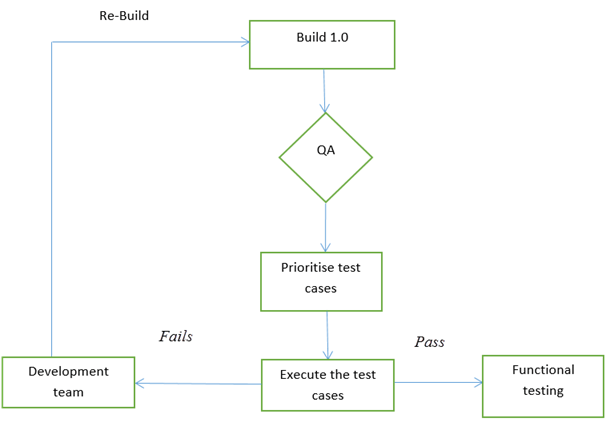
In this testing method, the development team deploys the build in QA. The subsets of test cases are taken, and then testers run test cases on the build. The QA team test the application against the critical functionalities. These series of test cases are designed to expose errors that are in build. If these tests are passed, QA team continues with Functional Testing.
Any failure indicates a need to handle the system back to the development team. Whenever there is a change in the build, we perform Smoke Testing to ensure the stability.
-
All the showstoppers in the build will get identified by performing smoke testing.
-
Smoke testing is done after the build is released to QA. With the help of smoke testing, most of the defects are identified at initial stages of software development.
-
With smoke testing, we simplify the detection and correction of major defects.
-
By smoke testing, QA team can find defects to the application functionality that may have surfaced by the new code.
-
Smoke testing finds the major severity defects.
Example: -New registration button is added in the login window and build is deployed with the new code. We perform smoke testing on a new build.
2.5.2 Who will do Smoke Testing?
After releasing the build to test environment, Smoke Testing is performed by QA engineers/QA lead. Whenever there is a new build, QA team determines the major functionality in the application to perform smoke testing. QA team checks for showstoppers in the application that is under testing.
2.5.3 How to do Smoke Testing?
Smoke Testing is usually done manually though there is a possibility of accomplishing the same through automation. It may vary from organization to organization.
2.5.4 Manual Smoke testing
In general, smoke testing is done manually. It approaches varies from one organization to other. Smoke testing is carried to ensure the navigation of critical paths is as expected and doesn’t hamper the functionality. Once the build is released to QA, high priority functionality test cases are to be taken and are tested to find the critical defects in the system. If the test passes, we continue the functional testing. If the test fails, the build is rejected and sent back to the development team for correction. QA again starts smoke testing with a new build version. Smoke testing is performed on new build and will get integrated with old builds to maintain the correctness of the system. Before performing smoke testing, QA team should check for correct build versions.
2.5.5 Smoke testing by Automation
Automation Testing is used for Regression Testing. However, we can also use a set of automated test cases to run against Smoke Test. With the help of automation tests, developers can check build immediately, whenever there is a new build ready for deployment.
Instead of having repeated test manually whenever the new software build is deployed, recorded smoke test cases are executed against the build. It verifies whether the major functionalities still operate properly. If the test fails, then they can correct the build and redeploy the build immediately. By this, we can save time and ensure a quality build to the QA environment.
Using an automated tool, test engineer records all manual steps that are performed in the software build.
2.6 Sanity Testing
Sanity testing is a kind of Software Testing performed after receiving a software build, with minor changes in code, or functionality, to ascertain that the bugs have been fixed and no further issues are introduced due to these changes. The goal is to determine that the proposed functionality works roughly as expected. If sanity test fails, the build is rejected to save the time and costs involved in a more rigorous testing.
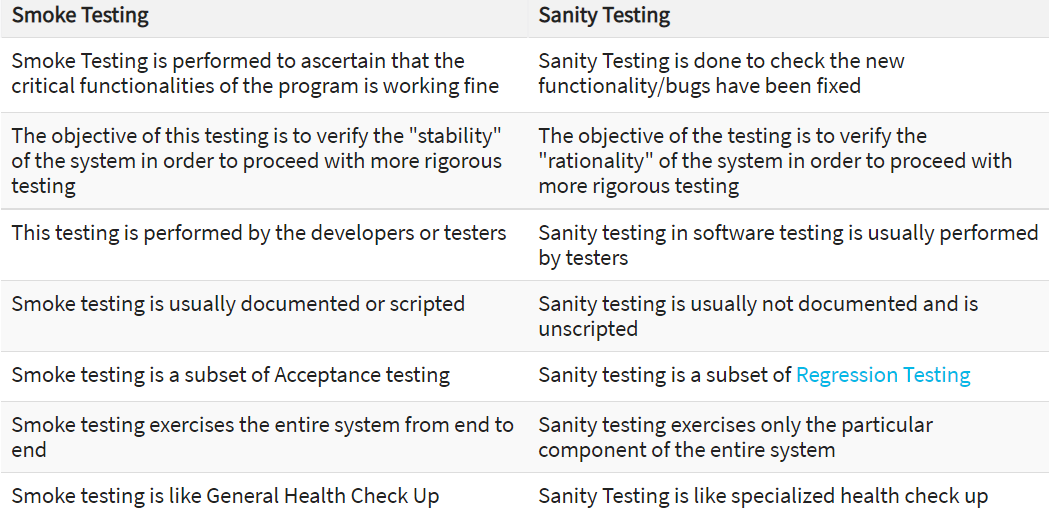
2.7 Sanity Testing and Smoke Testing difference
-
Both Sanity and Smoke testing are ways to avoid wasting time and effort by quickly determining whether an application is too flawed to merit any rigorous testing.
-
Smoke Testing is also called tester acceptance testing.
-
Smoke testing performed on a particular build is also known as a build verification test.
-
One of the best industry practices is to conduct a Daily build and smoke test in software projects.
-
Both smoke and sanity tests can be executed manually or using an automation tool. When automated tools are used, the tests are often initiated by the same process that generates the build itself.
-
As per the needs of testing, team may have to execute both Sanity and Smoke Tests in the software build. In such cases, first execute Smoke tests and then go ahead with Sanity Testing. In industry, test cases for Sanity Testing are commonly combined with that for smoke tests, to speed up test execution. Hence, it’s a common that the terms are often confused and used interchangeably
2.8 Regression Testing
Regression Testing is defined as a type of software testing to confirm that a recent program or code change has not adversely affected existing features.
2.8.1 Why Regression Testing?
Regression Testing is nothing but a full or partial selection of already executed test cases which are re-executed to ensure existing functionalities work fine.
This testing is done to make sure that new code changes should not have side effects on the existing functionalities. It ensures that the old code still works once the latest code changes are done.
The Need of Regression Testing mainly arises whenever there is requirement to change the code and we need to test whether the modified code affects the other part of software application or not. Moreover, regression testing is needed, when a new feature is added to the software application and for defect fixing as well as performance issue fixing.
2.8.2 How to do Regression Testing?
To do Regression Testing process, we need to first debug the code to identify the bugs. Once the bugs are identified, required changes are made to fix it, then the regression testing is done by selecting relevant test cases from the test suite that covers both modified and affected parts of the code.
Software maintenance is an activity which includes enhancements, error corrections, optimization, and deletion of existing features. These modifications may cause the system to work incorrectly. Therefore, Regression Testing becomes necessary.
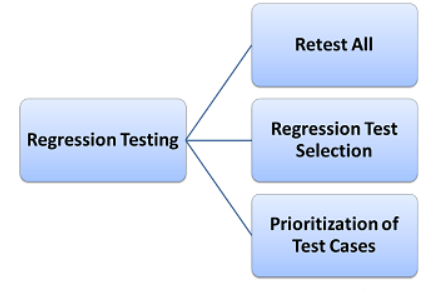
-
Test cases which have frequent defects
-
Functionalities which are more visible to the users
-
Test cases which verify core features of the product
-
Test cases of Functionalities which has undergone more and recent changes
-
All Integration Test Cases
-
All Complex Test Cases
-
Boundary value test cases
-
A sample of Successful test cases
-
A sample of Failure test cases
Regression testing also should be securing below aspects.
-
Code being regression tested should be under a configuration management tool
-
No changes must be allowed to code, during the regression test phase. Regression test code must be kept immune to developer changes.
-
The database used for regression testing must be isolated. No database changes must be allowed
2.8.3 When to Go for Regression Automation?
So, the words “automated” and “regression testing” go together. In case a product doesn’t have complex architecture and a long list of features to check, a regression can remain manual. It may be more time-consuming than useful to set up automation.
A QA team runs regression testing as a part of every release – after developers add new features or fix bugs. If suchlike code iterations are frequent and the functionality is large, regression automation is a must.
In general, there are several software features that encourage using automation for its checkup, and these features are true for regression as well. The tests should be:
-
stable.
-
simple.
-
frequently repeated.
-
worth maintaining.
The more of these things describe regression test suite, the higher is the need for automation. Remember that in addition to new features, database, operating system, and browser updates can cause bugs, too. Automating regression tests will keep the team prepared for the emergency and with enough time for manual exploration.
2.8.4 Best Practices for Regression Testing
-
Prioritize cases based on their business impact: sanity tests come first, then cases for essential functionalities, and then those that bring moderate project value.
-
Include test cases that cover the core software functionality and test cases for bugs that occur repeatedly.
-
Go with the mix of positive and negative tests. Always include tests that are known to fail and those that are known to pass.
-
Always test user-facing code since errors visible to users will be noticed immediately, unlike some invisible failures of the same severity.
-
Test for edge cases and domain bugs, especially those related to the latest code changes.
-
Finally, categorize the selected test cases as repetitive, reusable, and obsolete. Add test cases for the new critical functionality.
2.9 System Testing
System Testıng is a level of testing that validates the complete and fully integrated software product. The purpose of a system test is to evaluate the end-to-end system specifications. Usually, the software is only one element of a larger computer-based system. Ultimately, the software is interfaced with other software/hardware systems. System Testing is actually a series of different tests whose sole purpose is to exercise the full computer-based system.
2.9.1 Why System Testing?
System Testing involves testing the software for following,
-
Testing the fully integrated applications including external peripherals in order to check how components interact with one another and with the system as a whole. This is also called End to End testing scenario.
-
Verify thorough testing of every input in the application to check for desired outputs.
-
Testing of the user’s experience with the application.
-
That is a very basic description of what is involved in system testing. Team need to build detailed test cases and test suites that test each aspect of the application as seen from the outside without looking at the actual source code.
2.9.2 Points to Consider about System Testing
-
Who the tester works for - This is a major factor in determining the types of system testing a tester will use. Methods used by large companies are different than that used by medium and small companies.
-
Time available for testing - Ultimately, all 50 testing types could be used. Time is often what limits us to using only the types that are most relevant for the software project.
-
Resources available to the tester - Of course some testers will not have the necessary resources to conduct a testing type. For example, if a tester working for a large software development firm, it is likely to have expensive automated testing software not available to others.
-
Software Tester’s Education- There is a certain learning curve for each type of software testing available. To use some of the software involved, a tester has to learn how to use it.
-
Testing Budget - Money becomes a factor not just for smaller companies and individual software developers but large companies as well.
2.10 Alpha Testing and Beta Testing
2.10.1 Alpha Testing
Alpha Testing is a type of acceptance testing; performed to identify all possible issues and bugs before releasing the final product to the end users. Alpha testing is carried out by the testers who are internal employees of the organization. The main goal is to identify the tasks that a typical user might perform and test them.
To put it as simple as possible, this kind of testing is called alpha only because it is done early on, near the end of the development of the software, and before beta testing.
2.10.2 Beta Testing
Beta Testing is performed by “real users” of the software application in “real environment” and it can be considered as a form of external User Acceptance Testing. It is the final test before shipping a product to the customers. Direct feedback from customers is a major advantage of Beta Testing. This testing helps to test products in customer’s environment.
Beta version of the software is released to a limited number of end-users of the product to obtain feedback on the product quality. Beta testing reduces product failure risks and provides increased quality of the product through customer validation.
2.10.3 Key Diffrences
-
Alpha Testing is performed by the Testers within the organization whereas Beta Testing is performed by the end users.
-
Alpha Testing is performed at Developer’s site whereas Beta Testing is performed at Client’s location.
-
Reliability and Security testing are not performed in-depth in Alpha Testing while Reliability, Security and Robustness are checked during Beta Testing.
-
Alpha Testing involves both Whitebox and Blackbox testing whereas Beta Testing mainly involves Blackbox testing.
-
Alpha Testing requires testing environment while Beta Testing doesn’t require testing environment.
-
Alpha Testing requires long execution cycle whereas Beta Testing requires only few weeks of execution.
-
Critical issues and bugs are addressed and fixed immediately in Alpha Testing whereas issues and bugs are collected from the end users and further implemented in Beta Testing.
2.10.4 When to Start Alpha Testing
-
Software requirements document or Business requirements specification
-
Test Cases for all the requirements
-
Testing Team with good knowledge about the software application
-
Test Lab environment setup
-
QA Build ready for execution
-
Test Management tool for uploading test cases and logging defects
-
Traceability Matrix to ensure that each design requirement has at least one Test Case that verifies it
2.10.5 When to Finalize Alpha Testing
-
All the test cases have been executed and passed.
-
All severity issues need to be fixed and closed
-
Delivery of Test summary report
-
Make sure that no more additional features can be included
-
Sign off on Alpha testing
2.10.6 When to Start Beta Testing
-
Sign off a document on Alpha testing
-
Beta version of the software should be ready
-
Environment ready to release the software application to the public
-
Tool to capture real time faults
2.10.7 When to Finalize Alpha Testing
-
All major and minor issues are closed
-
Feedback report should be prepared from public
-
Delivery of Beta test summary report
2.11 Performance Testing
Performance Testing is a software testing process used for testing the speed, response time, stability, reliability, scalability and resource usage of a software application under particular workload. The main purpose of performance testing is to identify and eliminate the performance bottlenecks in the software application. It is a subset of performance engineering and also known as “Perf Testing”.
The focus of Performance Testing is checking a software program’s;
-
Speed - Determines whether the application responds quickly
-
Scalability - Determines maximum user load the software application can handle.
-
Stability - Determines if the application is stable under varying load
2.11.1 Why do Performance Testing?
Features and Functionality supported by a software system is not the only concern. A software application’s performance like its response time, reliability, resource usage and scalability do matter. The goal of Performance Testing is not to find bugs but to eliminate performance bottlenecks.
Performance Testing is done to provide stakeholders with information about their application regarding speed, stability, and scalability. More importantly, Performance Testing uncovers what needs to be improved before the product goes to market. Without Performance Testing, software is likely to suffer from issues such as: running slow while several users use it simultaneously, inconsistencies across different operating systems and poor usability.
Performance testing will determine whether their software meets speed, scalability and stability requirements under expected workloads. Applications sent to market with poor performance metrics due to nonexistent or poor performance testing are likely to gain a bad reputation and fail to meet expected sales goals.
2.11.2 Types of Performance Testing
Load testing - checks the application’s ability to perform under anticipated user loads. The objective is to identify performance bottlenecks before the software application goes live.
Stress testing - involves testing an application under extreme workloads to see how it handles high traffic or data processing. The objective is to identify the breaking point of an application.
Endurance testing - is done to make sure the software can handle the expected load over a long period of time.
Spike testing - tests the software’s reaction to sudden large spikes in the load generated by users.
Volume testing - Under Volume Testing large no. of. Data is populated in a database and the overall software system’s behavior is monitored. The objective is to check software application’s performance under varying database volumes.
Scalability testing - The objective of scalability testing is to determine the software application’s effectiveness in “scaling up” to support an increase in user load. It helps plan capacity addition to software system.
2.11.3 Performance Testing Process

The methodology adopted for performance testing can vary widely but the objective for performance tests remain the same. It can help demonstrate that software system meets certain pre-defined performance criteria. Or it can help compare the performance of two software systems. It can also help identify parts of software system which degrade its performance.
-
Identify testing environment
-
Identify the performance acceptance criteria
-
Plan & design performance tests
-
Configure the test environment
-
Implement test design
-
Run the tests
-
Analyze, tune and retest
2.11.4 Example Performance Test Cases
-
Verify response time is not more than 4 secs when 1000 users access the website simultaneously.
-
Verify response time of the Application Under Load is within an acceptable range when the network connectivity is slow
-
Check the maximum number of users that the application can handle before it crashes.
-
Check database execution time when 500 records are read/written simultaneously.
-
Check CPU and memory usage of the application and the database server under peak load conditions
-
Verify response time of the application under low, normal, moderate and heavy load conditions.
During the actual performance test execution, vague terms like acceptable range, heavy load, etc. are replaced by concrete numbers. Performance engineers set these numbers as per business requirements, and the technical landscape of the application.
2.12 Security Testing
Securıty Testıng is a type of Software Testing that uncovers vulnerabilities, threats, risks in a software application and prevents malicious attacks from intruders. The purpose of Security Tests is to identify all possible loopholes and weaknesses of the software system which might result in a loss of information, revenue, repute at the hands of the employees or outsiders of the Organization.
2.12.1 Why Security Testing is Important?
The main goal of Security Testing is to identify the threats in the system and measure its potential vulnerabilities, so the threats can be encountered and the system does not stop functioning or can not be exploited. It also helps in detecting all possible security risks in the system and helps developers to fix the problems through coding.
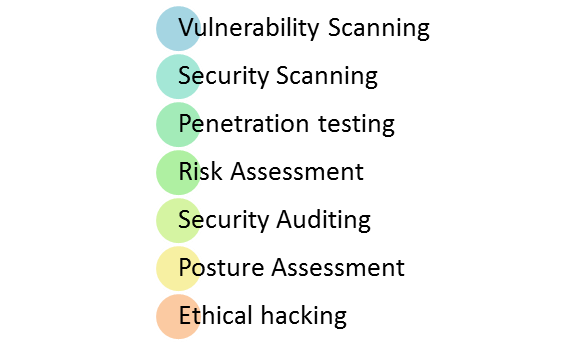
2.12.2 Types of Security Testing
-
Vulnerability Scanning: This is done through automated software to scan a system against known vulnerability signatures.
-
Security Scanning: It involves identifying network and system weaknesses, and later provides solutions for reducing these risks. This scanning can be performed for both Manual and Automated scanning.
-
Penetration testing: This kind of testing simulates an attack from a malicious hacker. This testing involves analysis of a particular system to check for potential vulnerabilities to an external hacking attempt.
-
Risk Assessment: This testing involves analysis of security risks observed in the organization. Risks are classified as Low, Medium and High. This testing recommends controls and measures to reduce the risk.
-
Security Auditing: This is an internal inspection of Applications and Operating systems for security flaws. An audit can also be done via line by line inspection of code
-
Ethical hacking: It’s hacking an Organization Software systems. Unlike malicious hackers, who steal for their own gains, the intent is to expose security flaws in the system.
-
Posture Assessment: This combines Security scanning, Ethical Hacking and Risk Assessments to show an overall security posture of an organization.
In security testing, different methodologies are followed, and they are as follows:
-
Tiger Box: This hacking is usually done on a laptop which has a collection of OSs and hacking tools. This testing helps penetration testers and security testers to conduct vulnerabilities assessment and attacks.
-
Black Box: Tester is authorized to do testing on everything about the network topology and the technology.
-
Grey Box: Partial information is given to the tester about the system, and it is a hybrid of white and black box models.
While gathering resouces following security testing roles should be considered;
-
Hackers - Access computer system or network without authorization
-
Crackers - Break into the systems to steal or destroy data
-
Ethical Hacker - Performs most of the breaking activities but with permission from the owner
-
Script Kiddies or packet monkeys - Inexperienced Hackers with programming language skill
2.12.3 How to do Security Testing
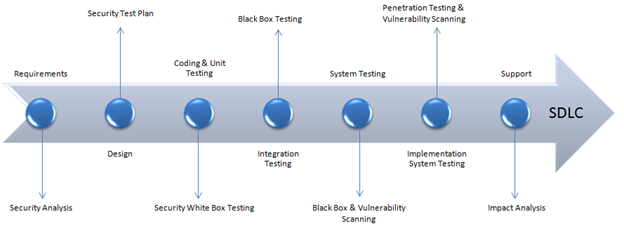
The test plan should include;
-
Security-related test cases or scenarios
-
Test Data related to security testing
-
Test Tools required for security testing
-
Analysis of various tests outputs from different security tools
2.12.4 Example Test Scenarios for Security Testing
Sample Test scenarios to give a glimpse of security test cases:
-
A password should be in encrypted format
-
Application or System should not allow invalid users
-
Check cookies and session time for application
2.12.5 Best Practices for Security Testing
-
Look for What Isn’t There -With security testing one should be more concerned with finding functionality that isn’t supposed to be there, rather than with specification-based testing which makes sure the code does what it’s supposed to do.
Instead of testing that application delivers the anticipated outcomes, team will be looking for unexpected side effects or behaviors that aren’t specified in the design. This will help team identify hidden vulnerabilities that could be exploited by anyone trying to gain access to application’s data.
-
Test Outside of Public Interfaces-Security testing can all too often be a matter of forcing as many inputs through an application’s API as possible. However, the inputs that arrive to an application through its API and other public interfaces are far outnumbered by those that arrive from the network and file system.Therefore, it’s much more important to test inputs that aren’t coming from public interfaces as this is the first place that attackers will look for a “way in” to access sensitive data.
-
Static Analysis-Static analysis inspects code at rest – without executing the program. It allows developers to perform a thorough inspection of every aspect of the software’s source code, in order to identify any flaws or back doors that will make application vulnerable to attack.Static analysis tools, which read through software code, can be programmed to look for clues that point to vulnerabilities that developers may not have identified during code reviews.
-
Dynamic Analysis-Dynamic analysis is the natural follow-on from static analysis. Dynamic testing is performed in a runtime environment, with security analysis carried out while the application is in operation. Dynamic analysis can reveal vulnerabilities and flaws that may be too subtle or complicated for static analysis to pick up on.
Dynamic testing tools can uncover hidden problems like memory manipulation or file access that don’t appear in plain view in the application’s API.
-
Test the Deployment Environment-A single misconfiguration or mistake in the setup process can render an otherwise secure application vulnerable. Therefore, it is vital to check for configuration errors before deployment.
If team is deploying an application to a server, they will need to check it for security. Desired action will should be to scan the server for open ports, review configuration files, and ensure that attackers can’t gain access to sensitive files or directories via the server.
-
Test Incident Response Procedures-Don’t wait until a security breach takes place to find out if incident response procedures are up to the task. By running breach simulation exercises with any high-priority vulnerabilities identified during security testing, test organization’s reaction to fixing the problem and developing and implementing the security patch.
This means that if a serious breach occurs after deployment, organization will be well practiced in incident response and remediation.
3 Document control
3.1 Contact person
Questions and feedback regarding this standard should be submitted to Olga Ovchinnikova
3.2 Revision History
| Version | Effective date | Purpose of change | Author |
|---|---|---|---|
| 1 | 01-Oct-2021 | First version of the document | Olga Ovchinnikova |
ANY QUESTIONS?